Elevate Your Screen: Download the Official MacBook Neo Wallpapers in Stunning High Resolution
Apple’s latest innovation, the MacBook Neo, has not only introduced a fresh perspective on budget-friendly laptops but also brought with it a series of captivating wallpapers designed to complement its aesthetic. These official wallpapers are now available for download, allowing users to enhance their devices with Apple’s signature design flair.
Introducing the MacBook Neo
The MacBook Neo stands out with its sleek design and impressive features, all at an accessible price point. Key specifications include:
– Display: A 13-inch Liquid Retina Display that offers vibrant colors and sharp visuals.
– Processor: Powered by the A18 Pro chip, featuring a 6-core CPU and a 5-core GPU, ensuring smooth performance for various tasks.
– Memory and Storage: Comes with 8GB of RAM and offers storage options of 256GB and 512GB, catering to different user needs.
– Battery Life: Up to 16 hours of battery life, making it suitable for extended use without frequent charging.
– Design: Available in four elegant color options: Blush, Indigo, Silver, and Citrus, each exuding a unique charm.
Aesthetic Appeal with Matching Wallpapers
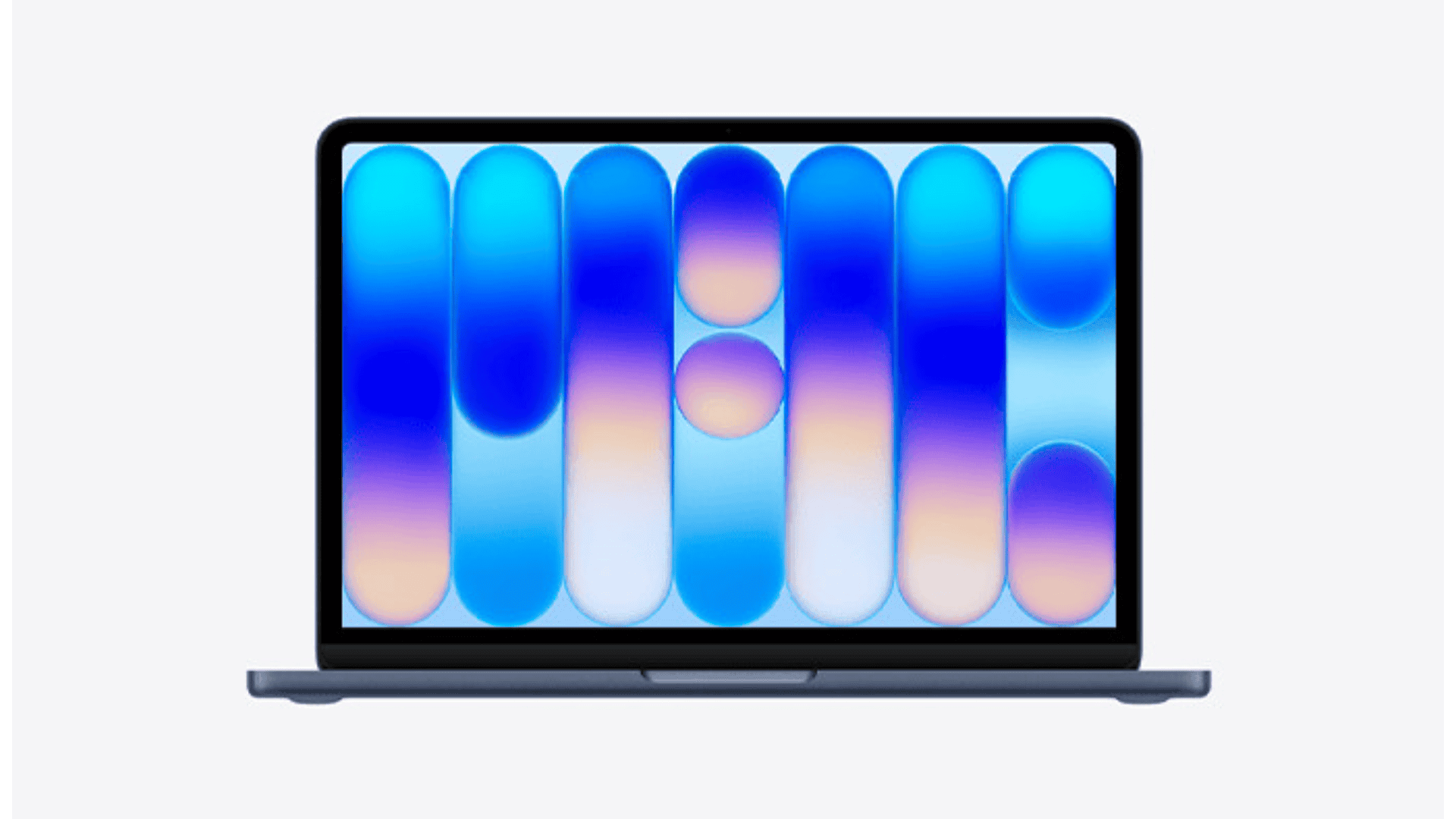
To harmonize with the MacBook Neo’s color palette, Apple has crafted four distinct wallpapers, each reflecting the device’s hues:
1. Blush: A soft and warm tone that adds a touch of elegance.
2. Indigo: A deep and rich shade that exudes sophistication.
3. Silver: A classic and timeless color that complements any setting.
4. Citrus: A vibrant and energetic hue that brings a fresh vibe.
These wallpapers feature minimalist geometric designs, characterized by translucent vertical pills and spheres, creating a modern and cohesive look that aligns with the MacBook Neo’s design language.
High-Resolution Quality
Understanding the importance of visual clarity, especially on high-definition displays, these wallpapers are provided in ultra-crisp 2x Retina resolution of 4816 x 3012 pixels. This ensures that the images remain sharp and detailed, whether viewed on the MacBook Neo’s native 2408 x 1506 display or larger 4K and 5K monitors.
How to Download the MacBook Neo Wallpapers
Acquiring these stunning wallpapers is a straightforward process:
1. Access the Download Links: Navigate to the official download page where each wallpaper is available.
2. Choose Your Preferred Color: Select the wallpaper that matches your aesthetic preference or device color.
3. Download the Image: Click on the Download Full Resolution link associated with your chosen wallpaper.
4. Save the Image: For Mac or PC users, right-click the full-size image and select Save Image As or Download Linked File. On mobile devices, tap and hold the image, then choose Save to Photos.
Setting the Wallpaper on Your Device
Once downloaded, setting the wallpaper is simple:
– On Mac:
1. Open the System Settings app.
2. Click on Wallpaper in the sidebar.
3. Scroll down to Add Photo or Video or drag and drop the downloaded file directly into the wallpaper preview window.
– On Windows:
1. Locate the downloaded image in File Explorer.
2. Right-click the image file.
3. Select Set as desktop background.
Enhancing Your Visual Experience
By integrating these official MacBook Neo wallpapers into your device, you not only personalize your screen but also immerse yourself in the design ethos that Apple meticulously crafts. Whether you’re using a Mac, PC, tablet, or smartphone, these wallpapers are optimized to provide a visually pleasing experience across various devices.
Frequently Asked Questions
1. Are these wallpapers exclusive to the MacBook Neo?
While designed to complement the MacBook Neo, these wallpapers can be used on any device, including other Mac models, PCs, tablets, and smartphones.
2. Will the wallpapers fit my screen resolution?
With a resolution of 4816 x 3012 pixels, these wallpapers are suitable for a wide range of screen sizes and resolutions, including 4K and 5K displays.
3. Can I use these wallpapers on my mobile device?
Yes, these wallpapers are compatible with mobile devices. However, you may need to crop or adjust the image to fit your screen dimensions.
4. Are there any restrictions on using these wallpapers?
These wallpapers are provided for personal use. If you plan to share them online, it’s recommended to link back to the original source as a courtesy.
Conclusion
The MacBook Neo wallpapers are a testament to Apple’s commitment to design excellence. By offering these high-resolution images, Apple allows users to extend the MacBook Neo’s aesthetic appeal to their personal devices, creating a cohesive and visually engaging experience.