Beelink Mate Mini 80Gbps Dock Review: Unleashing Full Potential Without Bandwidth Constraints
The Beelink Mate Mini 80Gbps Dock emerges as a game-changer for Mac mini M4 users, addressing longstanding bandwidth limitations in port expansion solutions. Traditionally, many docks have been constrained by limited bandwidth, often relying on 10Gbps USB-C connections. This setup frequently leads to performance bottlenecks when multiple peripherals are connected. Beelink’s latest offering, however, leverages Thunderbolt 5 technology, providing a substantial 80Gbps bandwidth, effectively eliminating these constraints.
Design and Aesthetics
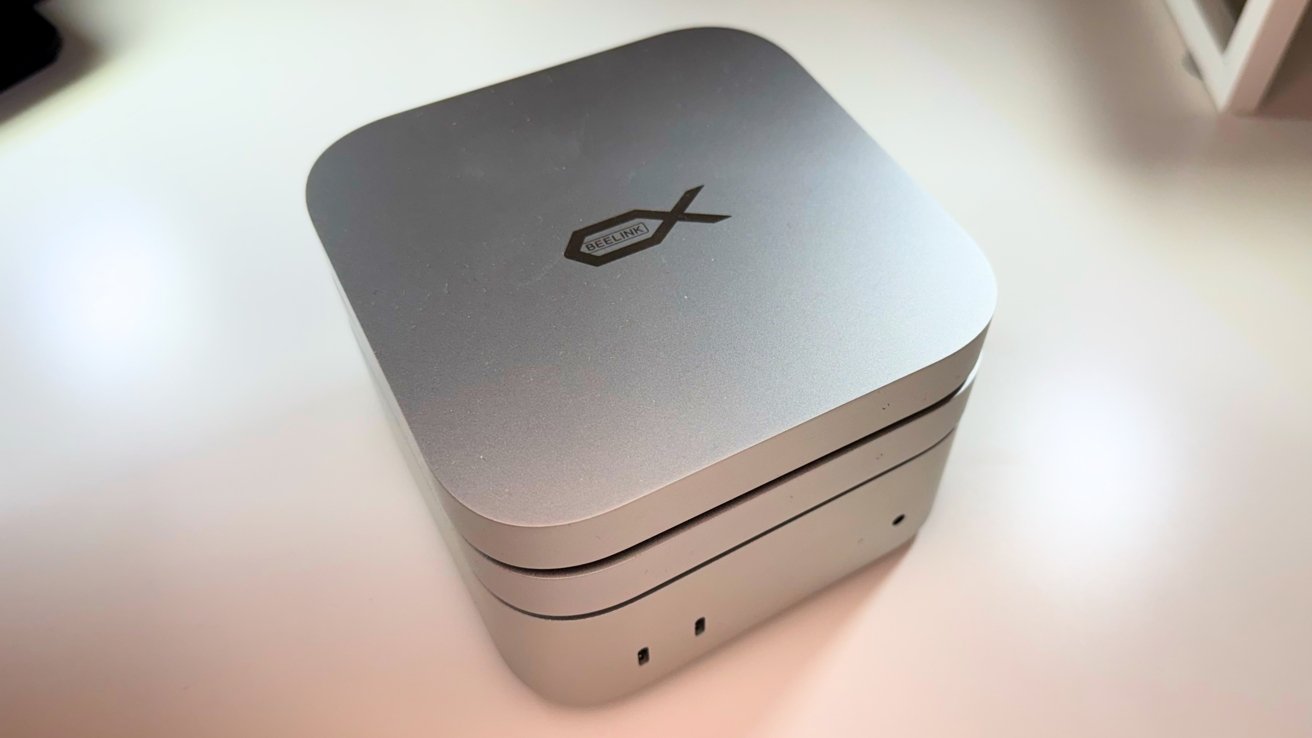
Tailored specifically for the Mac mini M4, the Beelink Mate Mini Dock boasts dimensions of 5 inches square and a slim profile of 0.6 inches in thickness. Its design mirrors the Mac mini’s aesthetics, featuring rounded corners and an aluminum alloy finish that closely matches Apple’s design language. The alignment of the front LED indicator and rear ports with those of the Mac mini ensures a cohesive and integrated appearance.
Versatility in placement is a key feature of this dock. Users can position it either beneath or atop the Mac mini, thanks to its thoughtful design that accommodates the device’s cooling system. To facilitate this flexibility, Beelink includes two short, U-shaped cables that connect the dock to the Mac mini, minimizing cable clutter and maintaining a clean setup.
While the dock’s design minimizes interference with the Mac mini’s Wi-Fi performance, a slight reduction of approximately 15% in Wi-Fi speeds was observed when the dock was placed directly beneath the Mac mini. This minor impact suggests that positioning the dock on top may be preferable for users who prioritize optimal wireless connectivity.
Connectivity and Ports
The Beelink Mate Mini Dock is equipped with a comprehensive array of ports to enhance the Mac mini’s connectivity options:
– USB-C Power Input: Located on the far left, this port allows for additional power input if connected peripherals exceed a 15W power draw. In standard configurations involving devices like microphones, keyboards, and SSDs, the dock operates efficiently without the need for extra power.
– USB Type-A Ports: Two USB 3.0 ports offer up to 5Gbps bandwidth each, suitable for connecting a variety of peripherals.
– 3.5mm Audio Jack: This front-facing port mirrors the Mac mini’s headphone jack functionality, providing a convenient connection point for speakers or headphones.
– Ethernet Port: A 2.5Gbps Ethernet port aligns perfectly with the Mac mini’s port layout, offering faster wired network connectivity compared to the standard 1Gbps Ethernet found on most Mac mini M4 models.
– SD 4.0 Memory Card Reader: Capable of transfer speeds up to 300MB/s, this slot facilitates quick data transfers from SD cards. Testing confirmed speeds around 200MB/s, making it a valuable tool for photographers and videographers.
Storage Expansion and Performance
Beelink offers the Mate Mini Dock in two configurations to cater to different user needs:
– Model A (High-Capacity): Features two M.2 PCIe 4.0 x2 slots, supporting up to 16TB of storage when populated with two 8TB SSDs.
– Model B (High-Speed): Includes a single M.2 PCIe 4.0 x4 slot, accommodating up to 8TB of storage with higher potential read and write speeds.
Performance testing revealed that Model A achieved read speeds up to 3,600MB/s and write speeds of 3,400MB/s. Model B demonstrated superior performance, with read speeds reaching 6,996MB/s and write speeds of 5,070MB/s. These results underscore the dock’s capability to handle demanding tasks such as video editing and large file transfers efficiently.
Installing SSDs involves removing the rubber feet and unscrewing the covers to access the M.2 slots. While this process requires basic technical knowledge, it is straightforward and manageable for most users.
Conclusion
The Beelink Mate Mini 80Gbps Dock stands out as a robust and thoughtfully designed expansion solution for Mac mini M4 users. Its support for Thunderbolt 5 ensures ample bandwidth for multiple peripherals and high-speed storage, effectively eliminating common bottlenecks associated with lesser docks. The dock’s design harmonizes with the Mac mini, offering both aesthetic appeal and functional versatility.
Pros:
– Comprehensive port selection
– Thunderbolt 5 support
– Flexible M.2 storage expansion options
Cons:
– SSD installation process is slightly more involved than typical, though still accessible
In summary, the Beelink Mate Mini Dock provides an effective and stylish solution for expanding the Mac mini’s capabilities without compromising on performance.