Argus 2.0: The Ultimate Python Toolkit for Comprehensive Cybersecurity Reconnaissance
In the ever-evolving landscape of cybersecurity, the need for robust and versatile tools is paramount. Enter Argus, a Python-powered toolkit meticulously crafted for information gathering and reconnaissance tasks. With the recent release of version 2.0, Argus has expanded its capabilities, now boasting an impressive suite of 135 modules designed to streamline and enhance the reconnaissance process for security professionals.
A Unified Interface for Diverse Reconnaissance Needs
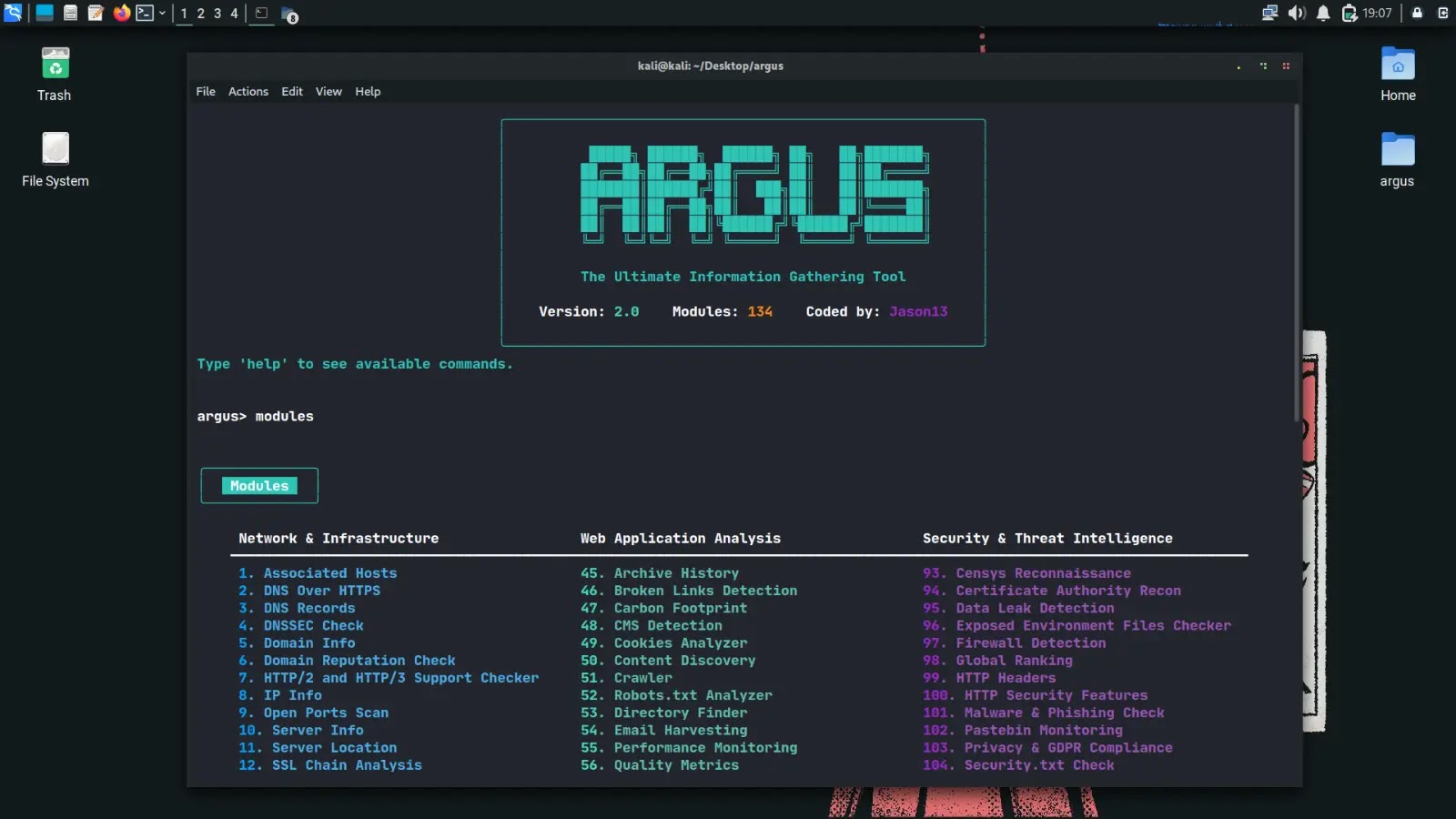
Argus stands out by consolidating various reconnaissance functionalities into a single, interactive command-line interface (CLI). This integration allows users to seamlessly navigate through modules, search for specific tools, mark favorites, and execute batch operations, thereby optimizing workflow efficiency.
Comprehensive Module Categories
The toolkit’s extensive module library is systematically categorized to address different facets of cybersecurity reconnaissance:
1. Network & Infrastructure Analysis (Modules 1-52): These modules are tailored for in-depth network assessments, including tasks such as DNS record retrieval, open port scanning, SSL chain analysis, and traceroute mapping.
2. Web Application Analysis (Modules 53-102): Focused on evaluating web applications, this category encompasses tools for Content Management System (CMS) detection, content discovery, JavaScript analysis, and Cross-Origin Resource Sharing (CORS) scanning.
3. Security & Threat Intelligence (Modules 103-135): Dedicated to gathering critical security insights, these modules facilitate operations like Shodan queries, VirusTotal scans, subdomain takeover assessments, and cloud exposure evaluations.
Adaptive Scanning Profiles
Recognizing the diverse needs of security assessments, Argus introduces customizable scanning profiles such as speed and deep. These profiles allow users to adjust thread counts and timeouts, enabling tailored scan intensities that align with specific project requirements.
Flexible Installation Options
Argus offers multiple installation methods to accommodate various user environments:
– Direct Execution: Ideal for quick tests, this method involves cloning the repository, installing dependencies, and running the toolkit directly.
– Pip Installation: For minimal setup, users can install Argus via pip, simplifying the deployment process.
– Full Installation: Suited for development purposes, this approach utilizes an installation script to set up the complete environment.
– Docker Deployment: For containerized environments, Argus can be built and run as a Docker image, ensuring consistency across different systems.
All installation methods are compatible with Linux, macOS, and Windows platforms, provided Python 3.10 or higher is installed.
User-Friendly Command-Line Interface
The interactive CLI of Argus is designed for intuitive navigation and operation:
– Module Management: Users can list available modules, select specific ones, set targets, and execute commands seamlessly.
– Batch Operations: Commands like runall infra enable the execution of all modules within a category, streamlining comprehensive assessments.
– API Integration: The show api_status command provides insights into the status of integrated APIs, ensuring smooth operation.
Integration with External APIs
To enhance its functionality, Argus supports integration with external services such as Shodan, VirusTotal, and Censys. Users can configure API keys within the settings file or through environment variables, unlocking advanced reconnaissance capabilities.
Versatile Output Formats
Understanding the importance of data analysis and reporting, Argus allows users to export scan results in multiple formats, including TXT, CSV, and JSON. This flexibility facilitates seamless integration with other tools and platforms for further analysis.
Significant Enhancements in Version 2.0
The release of Argus 2.0 marks a substantial upgrade from its predecessors:
– Expanded Command Set: Over 25 new commands have been introduced, broadening the toolkit’s functionality.
– Multithreading Support: The addition of multithreading enhances performance, allowing for faster and more efficient scans.
– User Interface Improvements: The CLI has been refined for better usability, ensuring a more intuitive user experience.
Ethical Usage and Legal Considerations
While Argus is a powerful tool for security assessments, it is imperative to use it responsibly. Users must obtain proper authorization before conducting scans to avoid legal repercussions. The developers have included a legal disclaimer within the toolkit to emphasize the importance of ethical usage.
Conclusion
Argus 2.0 emerges as a comprehensive and versatile solution for cybersecurity professionals engaged in reconnaissance tasks. Its extensive module library, adaptive scanning profiles, flexible installation options, and user-friendly interface make it an invaluable asset in the field of cybersecurity. By consolidating various reconnaissance tools into a single platform, Argus simplifies workflows and enhances the efficiency of security assessments.