Enhancing MacBook Longevity: macOS 26.4 Introduces Charge Limit Feature
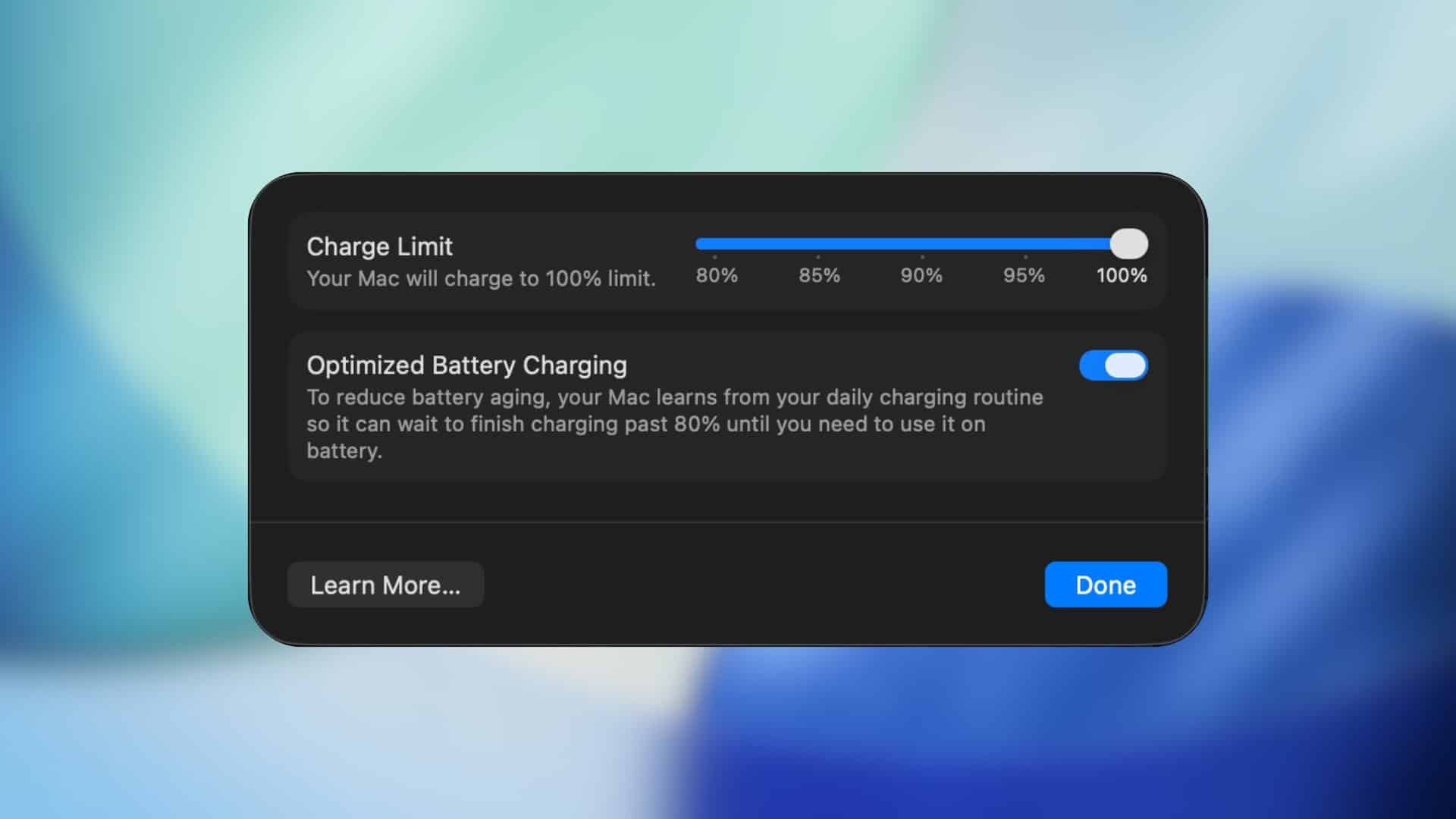
Apple has unveiled a significant update in its macOS 26.4 beta, introducing the Charge Limit feature aimed at prolonging MacBook battery health. This functionality allows users to set a maximum charge level between 80% and 100%, preventing the battery from reaching full capacity and thereby reducing long-term wear. Previously available on iPhones and iPads, this feature now extends to MacBooks, addressing the needs of users who frequently keep their laptops plugged in for extended periods.
Understanding the Charge Limit Feature
Lithium-ion batteries, commonly used in MacBooks, tend to degrade faster when maintained at full charge for prolonged durations. By capping the charge at a user-defined level, the Charge Limit feature minimizes chemical stress, thereby enhancing the battery’s lifespan. This is particularly beneficial for individuals who use their MacBooks in stationary setups, such as office desks, where the device remains connected to power for most of the day.
Integration with Shortcuts for Automation
A notable aspect of the Charge Limit feature is its integration with the Shortcuts app, enabling users to automate charging preferences based on specific conditions like time, location, or usage patterns. For instance, users can configure their MacBook to limit charging to 80% upon arriving at the office, allow a full charge before travel days, or adjust the charge limit during weekends. This automation ensures that the battery management aligns seamlessly with the user’s daily routine without requiring manual adjustments.
Occasional Full Charges for Calibration
To maintain accurate battery state-of-charge estimates, Apple notes that the system will occasionally charge the battery to 100%. This recalibration ensures that the battery percentage indicator remains reliable over time. Users can rest assured that these full charges are intentional and contribute to the overall health and accuracy of the battery management system.
Daily Use Impact and User Considerations
The Charge Limit feature is particularly advantageous for users who predominantly use their MacBooks in environments where the device remains plugged in, such as office workers and students. By preventing the battery from staying at full capacity continuously, the feature helps slow down battery degradation and preserves long-term health. However, for users who frequently rely on their MacBook’s battery while on the go, it’s essential to adjust the charge limit settings to ensure sufficient battery life during periods of heavy mobile use.
How to Enable and Configure Charge Limit
To take advantage of the Charge Limit feature, users can follow these steps:
1. Open System Settings on your Mac.
2. Navigate to the Battery section.
3. Select the Charge Limit option.
4. Choose the desired maximum charge level between 80% and 100%.
By configuring this setting, users can tailor their MacBook’s charging behavior to suit their specific usage patterns and preferences.
Conclusion
The introduction of the Charge Limit feature in macOS 26.4 marks a significant step forward in Apple’s commitment to enhancing device longevity and user experience. By providing users with greater control over their MacBook’s charging habits and integrating automation through the Shortcuts app, Apple empowers users to optimize battery health proactively. As this feature becomes widely available, MacBook users are encouraged to explore and implement Charge Limit settings to ensure their devices remain in optimal condition for years to come.