Apple Enhances macOS Security with New ClickFix Attack Warnings in Tahoe 26.4
Apple has introduced a significant security enhancement in the macOS Tahoe 26.4 release candidate, aiming to protect users from a prevalent social engineering tactic known as ClickFix attacks. This new feature actively monitors and intercepts potentially malicious commands pasted into the Terminal application, thereby preventing unauthorized code execution.
Understanding ClickFix Attacks
ClickFix attacks exploit user trust by presenting deceptive prompts that instruct individuals to copy and paste commands into their system’s command-line interface. These prompts often masquerade as legitimate error messages or security verifications, leading users to inadvertently execute harmful code. Since the execution is user-initiated, traditional security measures may fail to detect and block these threats.
How macOS Tahoe 26.4 Addresses ClickFix
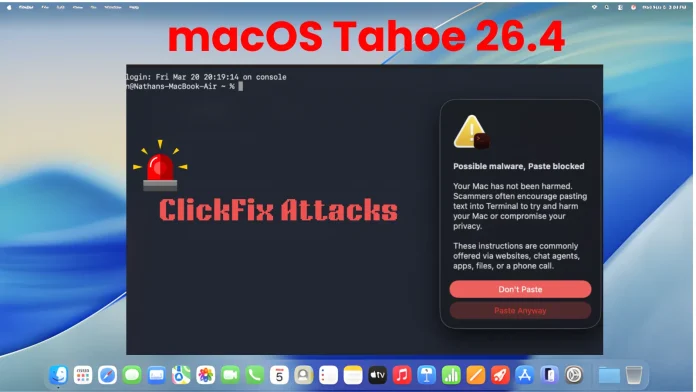
In response to the growing prevalence of ClickFix attacks, macOS Tahoe 26.4 introduces a proactive security measure within the Terminal application. When a user attempts to paste a command copied from external sources, such as web browsers, the system evaluates the content for potential risks. If the command is deemed suspicious, the paste operation is halted, and a warning prompt is displayed.
This warning informs users of the potential danger, stating: Possible malware, Paste blocked. It further explains that scammers may encourage pasting text from websites or chat agents to compromise system security. Users are then given two options: Don’t Paste to cancel the operation or Paste Anyway to proceed if they trust the source. To minimize disruption, this alert appears only once per session.
Additional Updates in macOS Tahoe 26.4
Beyond the ClickFix protection, macOS Tahoe 26.4 includes several updates for developers and system administrators:
– Rosetta Deprecation: Apple reminds users that macOS Tahoe 26 is the final release supporting Intel-based Macs. Organizations can manage related notifications using the `allowRosettaUsageAwareness` configuration key.
– Virtualization Bug Fix: The update resolves an issue causing new macOS Tahoe virtual machine installations to boot to a black screen on certain hardware configurations.
– Networking Memory Leak Repair: A memory leak involving Automatic Proxy Configuration (PAC) objects has been addressed.
– Developer Tool Enhancements: Developers are advised to upgrade to Xcode 26.4 to prevent potential hangs when using Address Sanitizer and Thread Sanitizer tools.
– Background Assets Management: Developers can now programmatically check the local availability of asset packs, improving resource management.
Implications for Users and Developers
The introduction of ClickFix protection in macOS Tahoe 26.4 underscores Apple’s commitment to user security. By proactively intercepting potentially harmful commands, this feature adds a crucial layer of defense against sophisticated social engineering attacks.
Users are encouraged to remain vigilant and avoid executing commands from untrusted sources. Developers should familiarize themselves with the new security measures and update their applications accordingly to ensure compatibility and maintain a secure user experience.