Android Auto’s Redesigned Media Player Now Available to More Users
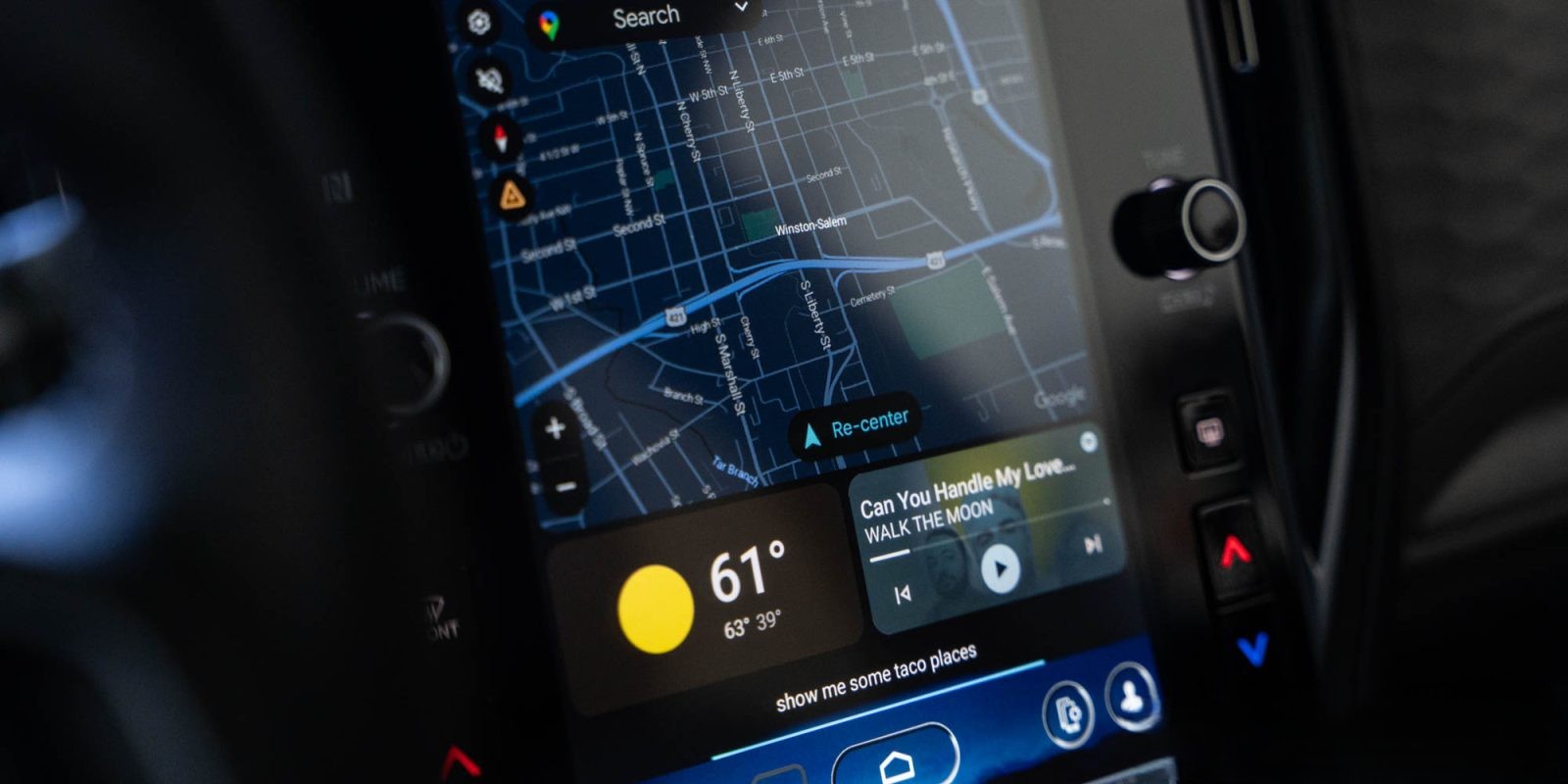
Google has begun a broader rollout of its redesigned media player for Android Auto, featuring the new Material 3 Expressive design. Initially introduced in January 2026, the update faced delays due to issues affecting steering wheel controls. These problems have since been resolved, and the updated media player is now reaching a wider audience.
Users on Reddit have reported noticing the new design appearing in their vehicles over the past 48 hours, with some experiencing the update overnight or within a few hours between drives. The redesign focuses on aesthetic enhancements to align with Google’s updated design language for Android, without introducing significant functional changes.
This update is part of Google’s ongoing efforts to improve the Android Auto experience. In January 2026, the Android Auto 16.0 update introduced a media player redesign that adjusted the layout of playback controls, placing the play/pause button in the bottom left corner with track controls adjacent to it. This change aimed to improve usability and visual appeal. ([9to5google.com](https://9to5google.com/2026/01/20/android-auto-media-player-redesign-update/?utm_source=openai))
However, Android Auto has faced several challenges in recent years. In February 2026, a bug caused the car icon to disappear from Google Maps, leaving users without a visual representation of their vehicle’s location. Although navigation and traffic data remained functional, the absence of the car icon was disorienting for many users. ([9to5google.com](https://9to5google.com/2026/02/04/android-auto-bug-causes-your-car-to-vanish-from-google-maps/?utm_source=openai))
In September 2025, another issue emerged where Android Auto displayed oversized apps and icons, giving the interface a zoomed-in appearance. This bug affected the usability of the system, making some apps nearly unrecognizable. The problem appeared inconsistently across different devices and Android Auto versions. ([9to5google.com](https://9to5google.com/2025/09/24/android-auto-bug-causes-giant-apps-and-icons-and-its-been-happening-for-months/?utm_source=openai))
Audio-related issues have also been a concern. In January 2025, Waze users reported that volume controls were broken on Android Auto, preventing them from adjusting navigation prompts and media volumes independently. This issue was linked to updates in Waze or Android Auto and affected users across various phone and car models. ([9to5google.com](https://9to5google.com/2025/01/16/waze-android-auto-volume-problems/?utm_source=openai))
In August 2025, users experienced a washed-out display and broken Spotify controls on Android Auto. The display issue caused the interface to appear gray, while the Spotify bug resulted in a blank widget on the dashboard and unresponsive in-car controls. These problems were reported by multiple users and highlighted the need for prompt fixes. ([9to5google.com](https://9to5google.com/2025/08/14/android-auto-spotify-washed-out-display-bugs/?utm_source=openai))
In September 2025, a bug made the music player widget unreadable due to background issues, rendering the text difficult to read. This problem was tied to the upcoming light theme in Android Auto and primarily affected users in the beta program. A temporary fix involved reverting to the stable release of Android Auto. ([9to5google.com](https://9to5google.com/2025/09/15/android-auto-music-player-widget-broken/?utm_source=openai))
In May 2021, some users encountered a bug where music playback would pause when opening any app on the connected phone while using Android Auto. This issue persisted for several months, with reports dating back to December 2020. Google acknowledged the problem and worked on a resolution. ([9to5google.com](https://9to5google.com/2021/05/03/android-auto-pause-music-bug/?utm_source=openai))
In September 2023, an update to Android Auto caused degraded audio quality for some users after using Google Assistant or making phone calls. The music sounded muffled or static-like, and the issue primarily affected aftermarket head units using ZLink software. Google marked the issue as infeasible to fix due to the uncertified nature of the affected products. ([9to5google.com](https://9to5google.com/2023/09/05/android-auto-audio-quality-bug/?utm_source=openai))
In November 2023, the Android 14 update led to broken music apps in Android Auto, with users reporting that music apps acted as if playing but produced no sound. This issue affected various music apps and vehicle models, primarily impacting Pixel phones. Google acknowledged the problem and sought further bug reports to investigate. ([9to5google.com](https://9to5google.com/2023/11/14/android-auto-music-apps-android-14/?utm_source=openai))
In January 2018, some Android Auto users reported pixelated screens, with visuals appearing blocky. This issue affected multiple car makes, models, and third-party head units. Google acknowledged the problem and worked on a fix. ([9to5google.com](https://9to5google.com/2018/01/19/android-auto-pixelated-screens/?utm_source=openai))
In February 2026, Tidal rolled out a fix for a playback-breaking bug in its Android Auto app. Users had reported issues with audio playback, including music stopping unexpectedly. The update aimed to resolve these problems and improve the user experience. ([9to5google.com](https://9to5google.com/2026/02/02/tidal-rolls-out-fix-for-audio-bug-android-auto/?utm_source=openai))
In May 2025, Android Auto prepared a media player change that altered the layout of playback controls, potentially affecting user muscle memory. The new layout placed the play/pause button on the left side, with back and forward buttons following. This change was part of Google’s efforts to enhance the interface’s usability and aesthetics. ([9to5google.com](https://9to5google.com/2025/05/14/android-auto-media-player-buttons-beta-change/?utm_source=openai))
The recent rollout of the redesigned media player reflects Google’s commitment to enhancing the Android Auto experience. Users are encouraged to share their experiences with the new design and report any issues to help improve the platform further.