Transform Your Photos: Enhance, Upscale, and Restore with Aiarty Image Enhancer
In the digital age, our photo libraries are filled with cherished memories captured over the years. However, many of these images, especially older ones, may not meet today’s high-resolution standards, appearing blurry or lacking in detail. Enter Aiarty Image Enhancer, a powerful Mac application designed to breathe new life into your photos by enhancing quality, reducing noise, fixing soft focus, and upscaling images to achieve natural clarity.
Why Choose Aiarty Image Enhancer?
Aiarty Image Enhancer stands out for its user-friendly interface and robust features, making it a top choice for both professionals and beginners. Key benefits include:
– Dual Enhancement Modes: Offers both manual controls and AI-driven inference to cater to various user preferences.
– Offline Processing: Ensures your photos remain secure by processing them locally without the need for internet connectivity.
– Natural Results: Delivers enhancements without over-sharpening or creating unnatural effects.
– Lifetime License: Provides a one-time purchase option with unlimited free updates, ensuring long-term value.
Core Features of Aiarty Image Enhancer
At its heart, Aiarty Image Enhancer is designed to:
– Enhance Photo Quality: Restore old photos, correct soft or blurry scans, and clean up images compressed by messaging apps.
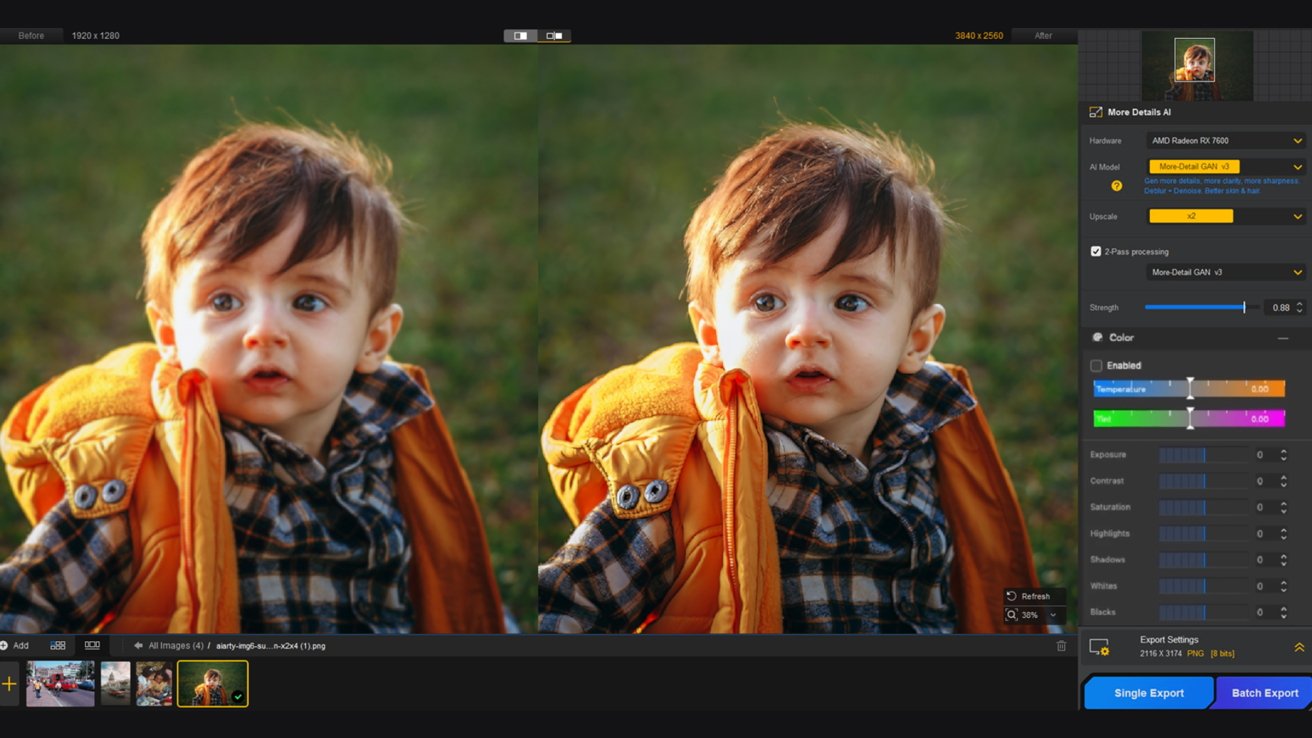
– Upscale Images: Choose from various upscaling options, including 2x, 4x, 8x, 4K, 8K, and custom resolutions, with the ability to run 2-pass processing for added detail.
– Adjust Enhancement Strength: Utilize real-time previews and a strength slider to achieve the desired level of enhancement.
– Restore Clarity: Ideal for family photos, archived images, low-resolution camera shots, and cropped images.
The application operates entirely offline on macOS and Windows, ensuring that your images never leave your device, thereby maintaining privacy and security.
How to Enhance Photos Using Aiarty Image Enhancer
Enhancing your photos with Aiarty is a straightforward process:
1. Add Photos: Import the images you wish to enhance into the application.
2. Select AI Model: Choose the appropriate AI model and preview the enhancements in real-time.
3. Set Resolution: Opt to maintain the original resolution or select from upscaling options like 2x, 4x, 8K, or custom dimensions.
4. Adjust Strength: Use the strength slider to fine-tune the enhancement level, balancing detail restoration with natural appearance.
5. Optional Adjustments: Make additional color corrections or retouching as needed.
6. Export: Save the enhanced photos individually or in bulk.
Aiarty’s models are optimized for Mac silicon chips and various hardware configurations, ensuring efficient processing for both single images and batch tasks.
AI Models and Best Practices
Aiarty Image Enhancer offers several AI models tailored to different photo types and restoration needs:
– More-Detail GAN v3: Restores images with enhanced clarity and sharpness, improving details in skin, fur, fabrics, and architectural surfaces. Utilizing 2-pass processing can further enhance details.
– Real-Photo v3: Ideal for wildlife shots, portraits, landscapes, low-light interiors, real estate images, and underwater photography. This model enhances clarity and corrects soft focus while preserving the original feel of the image.
– AIGCsmooth v3: Best suited for digital illustrations, artwork, and AI-generated content, providing a smoother, more natural look.
Users can easily switch between models and adjust the strength to achieve the desired results without technical expertise.
Practical Applications and Tips
– Photography Enhancement: For large images like wildlife photography, Aiarty’s noise reduction effectively cleans up photos while preserving clear and vivid details. It distinguishes high ISO noise from natural textures, delivering faithful results without altering artistic intent.
– Restoring Old Photos and Portraits: Begin with standard quality enhancement using models like More-Detail or Real-Photo. For old portraits and low-resolution images, enabling the face restoration feature and gradual upscaling can restore skin details and reduce blur, achieving natural clarity.
– Object Removal and Quality Enhancement: Use the built-in erase tool to remove blemishes and unwanted objects, enhancing the overall quality of your photos.
Exclusive Offer
For a limited time, Aiarty Image Enhancer is available at a 49% discount on the lifetime license, offering a one-time purchase with full features and unlimited free updates to all future versions.
Conclusion
Aiarty Image Enhancer provides a comprehensive solution for enhancing photo quality, upscaling images with natural details, restoring old and compressed photos, and optimizing workflows with additional features like object removal and color tools. For those looking to revitalize their photo collections plagued by noise, blemishes, and blurriness, this offline image enhancer offers a secure, high-quality, and cost-effective solution.