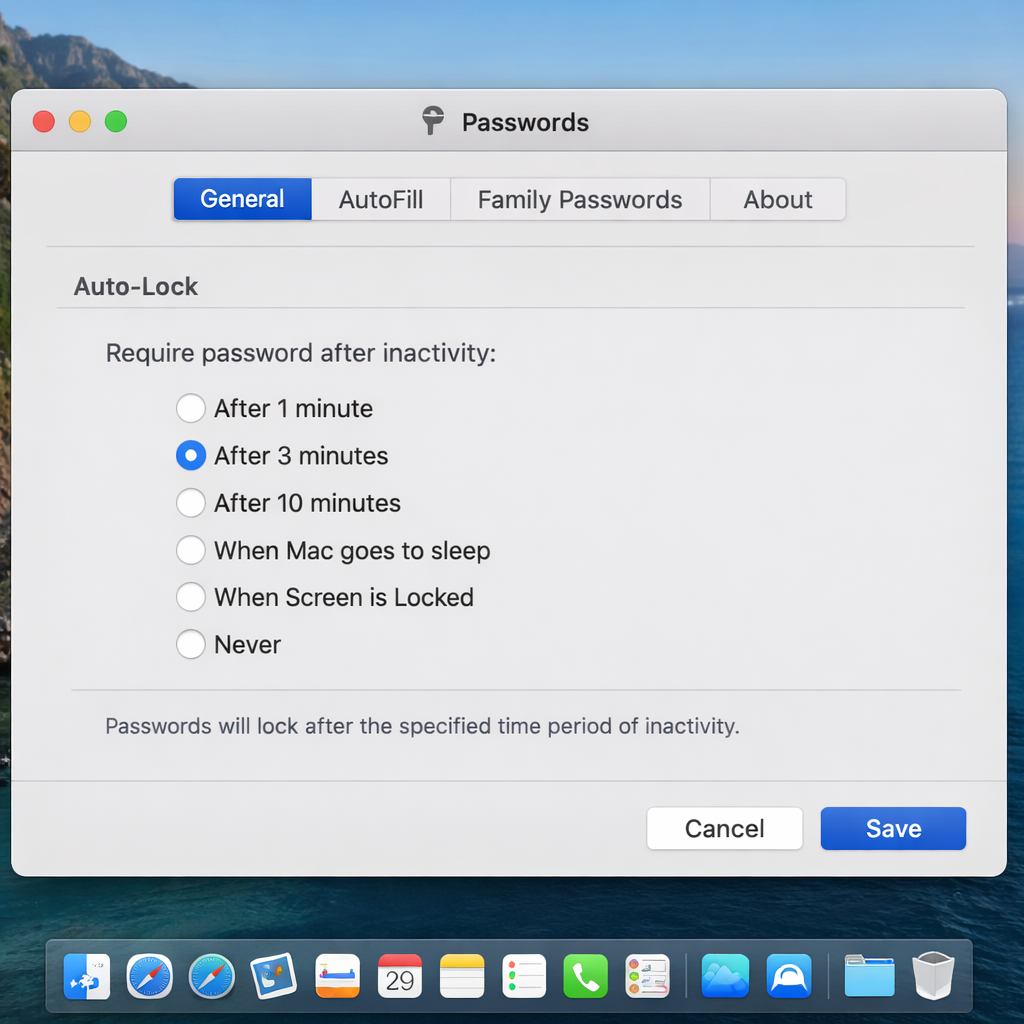
Apple is expanding flexibility in its Passwords app on Mac with a new feature allowing users to choose how and when the app locks itself. The change, found in the macOS 27.3 beta, introduces customizable timeout settings instead of the current fixed lock period. This means users can tailor the behavior based on their workflow and security needs.
What’s Changing in Passwords App Locking
Under the upcoming update, users will be able to choose one, three, or ten minutes of inactivity before automatic locking. Additional options allow the app to lock whenever the Mac sleeps or is locked, or to never lock automatically. Today, the Passwords app defaults to a three-minute inactivity timeout with no way to adjust that timeframe.
Context and Timeline
The dedicated Passwords app debuted as part of macOS Sequoia in September 2024, replacing the older password management UI and bringing features aimed at consolidating login items and iCloud credentials under one roof. Currently shipping users run macOS 27.2 or earlier, where the three-minute inactivity lock is baked in.
macOS 27.3 is slated for release in December, and with it, this new lock control is expected to roll out to all users. Early access through the beta reveals the settings panel already displays the fresh options under inactivity timeout preferences.
By offering these additional timeout tiers and behavior controls, Apple is letting users—particularly power users or those in shared environments—fine-tune how secure or convenient the Passwords app should be.
Valuable as these updates may seem, the changes reflect a broader shift in Apple’s approach to balancing usability and security—something many have been watching since password management became a frontline concern in everyday computing. What’s next: seeing how these new options are tuned before GA, whether users ask for even shorter timeouts, or whether similar settings will spread to other sensitive apps.