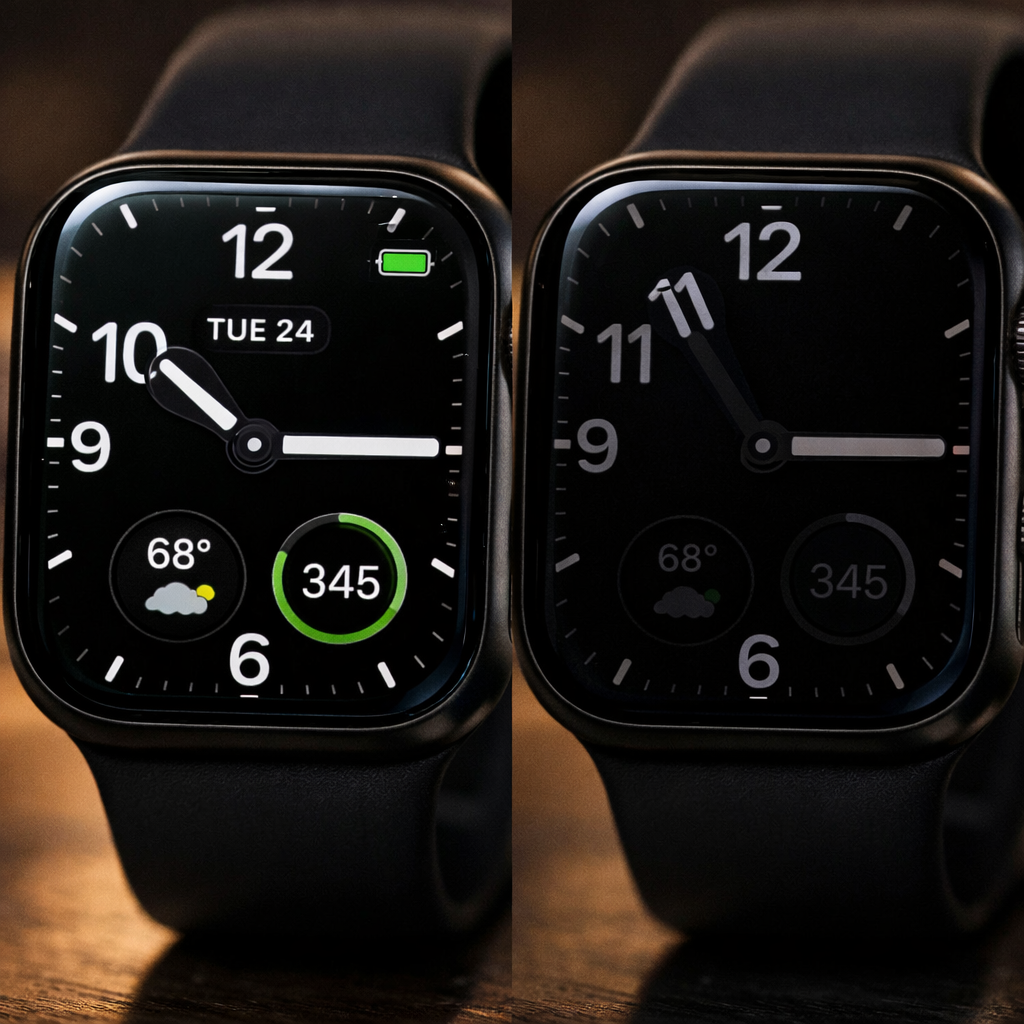
After the recent end of daylight saving time in the UK and much of central Europe, users running watchOS 27 are reporting a display bug on Apple Watch devices. The issue appears when clocks move back an hour, prompting the Always-On display to continue showing the old “summer time,” even though the active display correctly reflects the updated time.
Multiple owners—including those in both the UK and central Europe—have shared in Apple support forums that their watches are off by one hour when in Always-On mode. The problem has also been observed during standby. Feedback so far mainly comes from users of watchOS 27, though there’s no official confirmation about which specific versions of the update are affected or which models of Apple Watch are involved.
What Users Have Tried
Several affected users say simple restarts fixed the time mismatch. In three reported cases, rebooting the watch caused both the active and Always-On display to sync properly with the new local time. Another user noted that changing the watch face resolved the issue.
As of now, Apple has not publicly acknowledged the bug, and it’s unclear whether an upcoming patch or smaller update addressing it is in the works. Users are advised to keep their devices current and monitor settings until a fix arrives.
Why This Matters
Daylight saving transitions are always a stress test for software, and clocks falling back often expose timing bugs in connected smart devices. Since Always-On display is meant to mirror key info like time continuously, discrepancies like this can erode trust in device accuracy—especially when users rely on the watch for sensitive, time-based tasks.
The U.S. will see its daylight saving time end on Sunday, November 1, 2026, so this glitch may become more widespread unless addressed before then. Whether it’s an issue in how watchOS handles time zone fallback or the Always-On feature specifically, it underscores the risks of complex display and power-management features interacting with system time changes.
Takeaway: if you have an Apple Watch on watchOS 27 and see the time discrepancy in Always-On or standby modes after a DST change, try restarting your device or switching watch faces. It’s a simple workaround until Apple issues an official remedy.
Analytical Angle: This isn’t just a minor annoyance—it reflects deeper design trade-offs in always active interfaces. Features like Always-On display are meant to deliver seamless, constant info, but that very continuity poses challenges when foundational system states change—like DST. WatchOS 27, which introduced numerous enhancements including more energy constrained features, might not yet have robust handling for clock rollback edge cases. For Apple, the key will be pushing a software update that closes the gap, while also ensuring future time changes—every fall and spring—are transparently handled, without user workarounds.