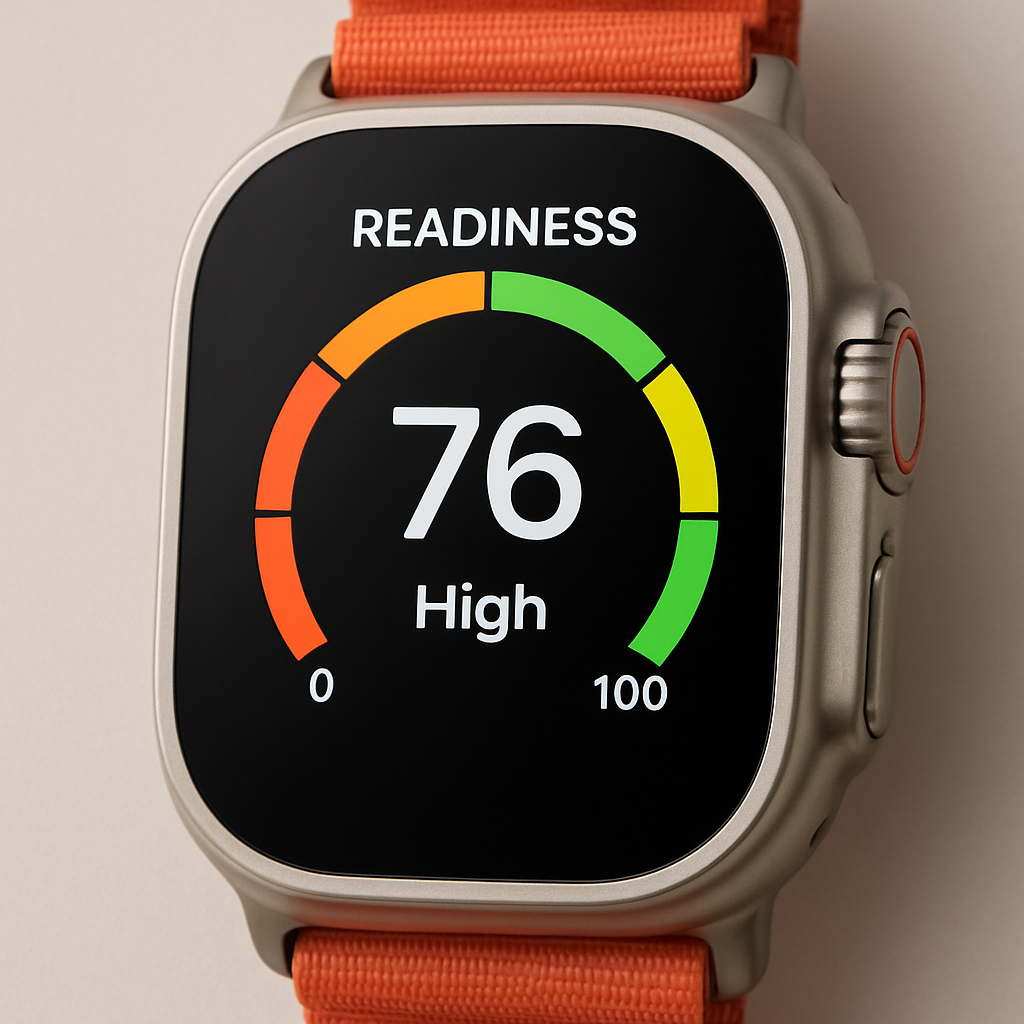
Apple has rolled out a fresh customization option for the Apple Watch Ultra 4, allowing its watch faces to feature a new bezel configuration showing your Readiness score. This was introduced alongside the Readiness app in watchOS, also present in the new Apple Watch Series 12, which evaluates health metrics like sleep, vitals, and fitness data.
What the Readiness Bezel Does
The Readiness bezel places both your numerical score and a short description at the bottom of supported watch faces. Around the bezel, four color-coded segments represent different Readiness categories, with a small dot indicating where your current score falls. Only the segment matching your score lights up.
Previously, Ultra models offered bezel options like Seconds, Depth, Elevation, or Training. With the addition of Readiness, bezel choices for compatible faces now include:
- None
- Seconds
- Depth
- Elevation
- Training
- Readiness
Which Faces Support It & Why It Matters
Watch faces such as Modular Ultra and the newly introduced Siri Modular can display bezel configurations, including this latest Readiness option. The Readiness feature draws on overnight vitals—heart rate, temperature, respiratory rate, and heart rate variability recovery—and daytime vitals like heart rate and HRV recovery to compute the score.
Since your Readiness score can shift throughout the day, having it right on the bezel offers glanceable, continuous feedback. For those who want to monitor recovery and readiness at a glance, this bezel tool makes that easier.
This subtle yet meaningful update enhances the Ultra 4’s strong health-focused identity. By integrating Readiness into the bezel, Apple is leaning harder into wellness tracking without cluttering the screen. It’s part of a trend toward more ambient, always-present health info rather than requiring users to open apps. Going forward, keep an eye on how these readiness metrics evolve—accuracy, insights, and how users integrate them into their routines may define their value beyond a cool UI touch.