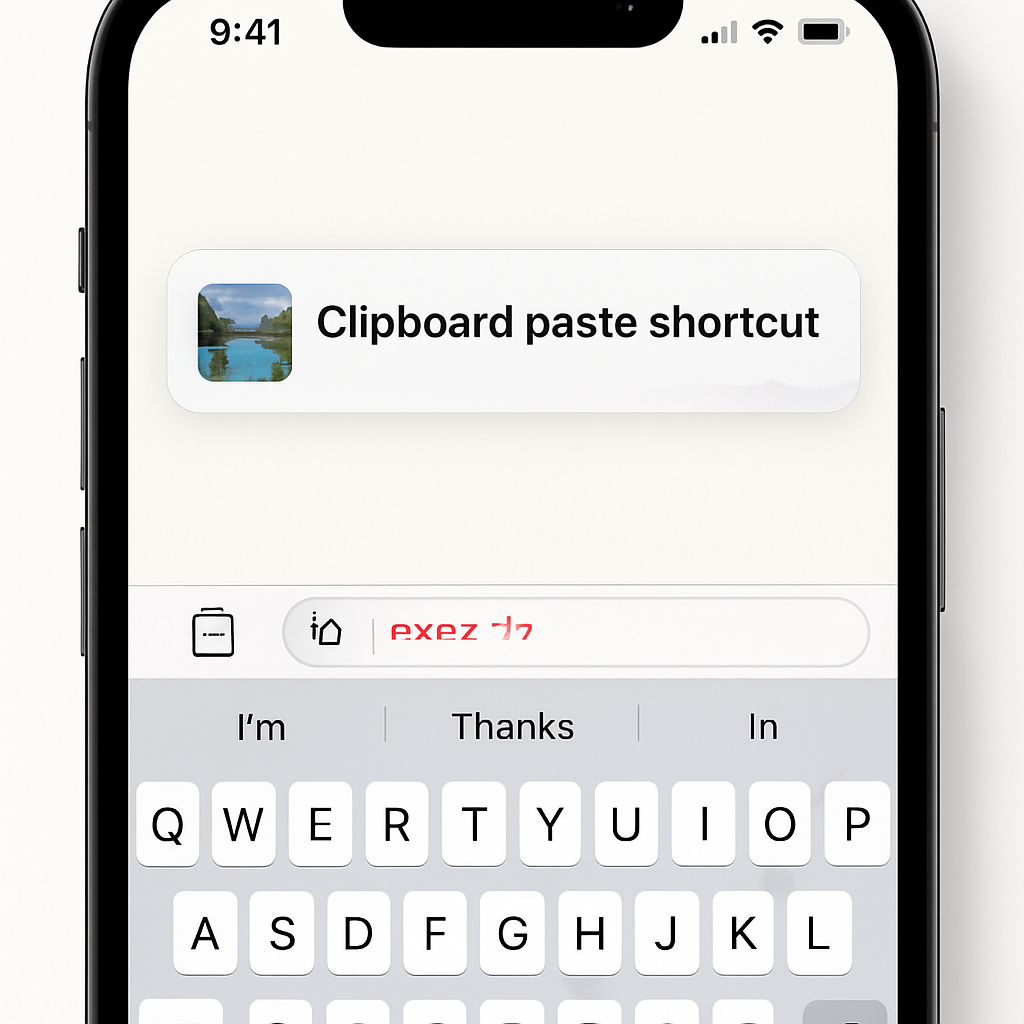
Apple’s iOS 27 brings a host of enhancements, with a particularly convenient addition aimed at streamlining the copy-paste process on iPhones. This new feature introduces a paste shortcut that appears directly above the keyboard, offering users a one-tap solution to insert clipboard content into text fields.
When users copy text, links, or images, and then navigate to a different app or text field, iOS 27 intelligently displays a paste suggestion above the keyboard. This shortcut not only provides immediate access to the clipboard’s contents but also includes a preview—text snippets or image thumbnails—allowing users to confirm the content before pasting.
This enhancement eliminates the need to manually invoke the copy-paste menu, thereby expediting the process and reducing potential errors. It’s a subtle yet impactful improvement that aligns with Apple’s ongoing efforts to enhance user experience through intuitive design.
Beyond this clipboard shortcut, iOS 27 introduces several other notable features. The Messages app now offers one-tap suggestions powered by Apple Intelligence, assisting users in tasks like creating reminders or sharing relevant information based on conversation context. Additionally, the Photos app has been updated to support full-resolution sharing in iCloud Shared Albums, ensuring that image quality is preserved when sharing with others.
These updates reflect Apple’s commitment to refining the iOS ecosystem, focusing on both major innovations and minor tweaks that collectively enhance daily interactions with the device. As users explore iOS 27, features like the clipboard shortcut are poised to become integral to the iPhone experience, demonstrating that even small changes can have a significant impact on usability.