Introducing OWASP CVE Lite CLI: A Developer-Centric Vulnerability Scanner
In the ever-evolving landscape of software development, ensuring the security of applications is paramount. Recognizing the need for a more developer-friendly approach to vulnerability scanning, the Open Web Application Security Project (OWASP) has introduced the CVE Lite CLI—a free, open-source tool designed to seamlessly integrate dependency security checks into developers’ daily workflows.
Bridging the Gap in Developer Security Workflows
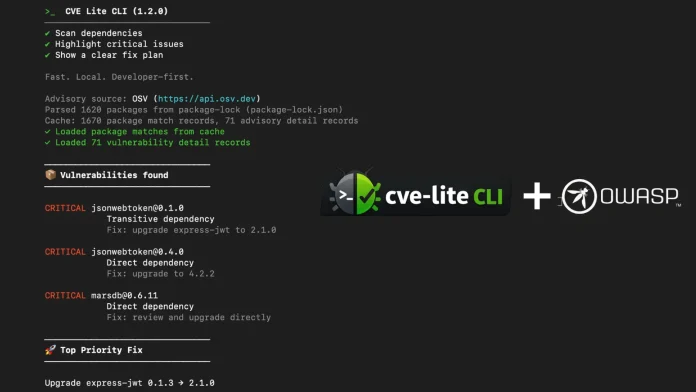
Traditional security scanners often operate within continuous integration (CI) pipelines, alerting developers to vulnerabilities post-code review. This delayed feedback can lead to alert fatigue, as developers are inundated with notifications that may lack immediate actionable guidance. OWASP’s CVE Lite CLI addresses this challenge by providing real-time, actionable remediation plans directly within the developer’s terminal, just before code is pushed. This proactive approach ensures that security becomes an integral part of the development process, rather than an afterthought.
Key Features of CVE Lite CLI
1. Comprehensive Dependency Analysis: The tool reads a project’s lockfile locally and queries the Open Source Vulnerabilities (OSV) database for advisory data. It supports all major JavaScript package managers, including npm, pnpm, Yarn, and Bun, ensuring broad applicability across various projects.
2. Privacy-Centric Operation: CVE Lite CLI operates entirely on the developer’s machine, ensuring that no source code, dependency trees, or credentials are transmitted externally. This local-first approach prioritizes user privacy and data security.
3. Direct and Transitive Dependency Management: Unlike many free scanners, CVE Lite CLI distinguishes between direct and transitive dependencies. For transitive vulnerabilities, it assesses whether a simple update of the parent package resolves the issue or if a major upgrade is necessary.
4. Remediation-First Output: Each identified vulnerability is accompanied by a validated, copy-and-run fix command, providing developers with immediate solutions rather than just a list of CVE identifiers.
5. Usage-Aware Reachability: By employing static analysis, the tool detects whether vulnerable packages are actually imported in the source code, effectively reducing false positives and focusing attention on genuine threats.
6. Offline Advisory Database: For environments with restricted internet access, CVE Lite CLI offers an offline advisory database. Developers can sync approximately 217,065 advisory records in under nine seconds using the `cve-lite advisories sync` command, ensuring up-to-date vulnerability information even in air-gapped settings.
7. Interactive HTML Reporting: The tool can generate self-contained HTML reports featuring severity cards, searchable findings tables, and copy-ready commands, facilitating comprehensive vulnerability assessments and documentation.
8. Auto-Fix Mode: With the `–fix` option, CVE Lite CLI applies validated fixes for direct dependencies using the detected package manager and automatically rescans the project to confirm the resolution of vulnerabilities.
9. CI/CD Integration: The tool is designed to integrate seamlessly into continuous integration and continuous deployment pipelines. Options like `–fail-on high` allow for non-zero exits on threshold breaches, while `–sarif` and `–cdx` generate outputs compatible with GitHub Code Scanning and CycloneDX 1.4 Software Bill of Materials, respectively.
10. AI Assistant Integration: CVE Lite CLI can write skill files for AI assistants such as Claude Code, Codex CLI, Gemini CLI, Cursor, and GitHub Copilot. This integration enables AI assistants to analyze scan outputs and generate prioritized fix plans, enhancing the efficiency of the remediation process.
Getting Started with CVE Lite CLI
Developers can easily install CVE Lite CLI with a single command, without the need for account creation or complex configurations:
“`bash
npm install -g cve-lite-cli
cve-lite /path/to/project
“`
Alternatively, for a one-off scan, the following command can be used:
“`bash
npx cve-lite-cli /path/to/project
“`
By integrating CVE Lite CLI into their development workflows, developers can proactively identify and remediate vulnerabilities, ensuring the delivery of secure and robust applications.