YouTube Introduces Personalized ‘Custom Feed’ Feature for Enhanced Video Discovery
In a significant update aimed at refining user experience, YouTube has unveiled a ‘custom feed’ feature on its homepage. This new addition allows users to curate video content tailored to their specific interests, offering a more dynamic and personalized viewing experience.
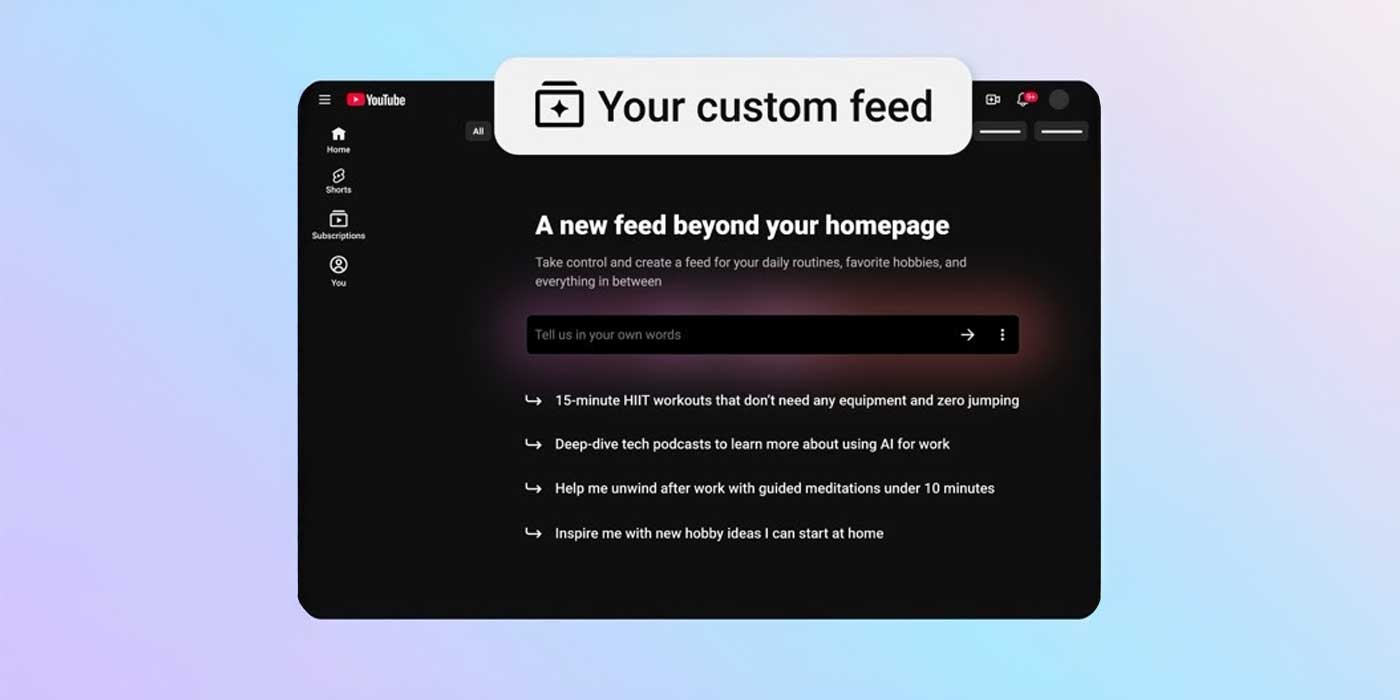
Positioned adjacent to the traditional search bar, the ‘custom feed’ button provides users with a prompt box upon selection. Here, individuals can input specific topics or choose from suggested queries to generate a feed that aligns with their preferences. This approach moves beyond the conventional search function, delivering a continuously refreshing stream of content that resonates with the user’s interests.
To enhance usability, YouTube offers the option to save these custom feeds as chips, which are accessible at the top of the homepage. Users can edit these feeds to refine the content further, ensuring that the videos presented remain relevant and engaging.
How to Use the ‘Custom Feed’ Feature:
1. Initiate Your Feed: Click on the Your custom feed chip located at the top of your Home page.
2. Define Your Interests: Enter a prompt describing your desired content or select from the suggested prompts provided by YouTube.
3. Modify as Needed: At any time, you can edit your prompt directly in the text box at the top of your custom feed to generate a new selection of videos.
This feature is currently available to users in the United States who are signed in with their watch history enabled. It is accessible on both the mobile app and desktop versions of YouTube.
By introducing the ‘custom feed,’ YouTube aims to offer a more personalized and engaging platform, allowing users to discover content that truly aligns with their interests.