Revolutionize Your Workflow: MacStories’ AI-Powered Shortcuts Playground
In the ever-evolving landscape of digital productivity, automation tools have become indispensable for streamlining tasks and enhancing efficiency. Apple’s Shortcuts app has long been a cornerstone for users seeking to automate actions on their devices. With the anticipated release of iOS 27, Apple is set to introduce AI-driven features that will allow users to create shortcuts using natural language commands. However, for those eager to harness the power of AI in shortcut creation without the wait, MacStories’ Federico Viticci offers an innovative solution: the Shortcuts Playground.
Introducing Shortcuts Playground
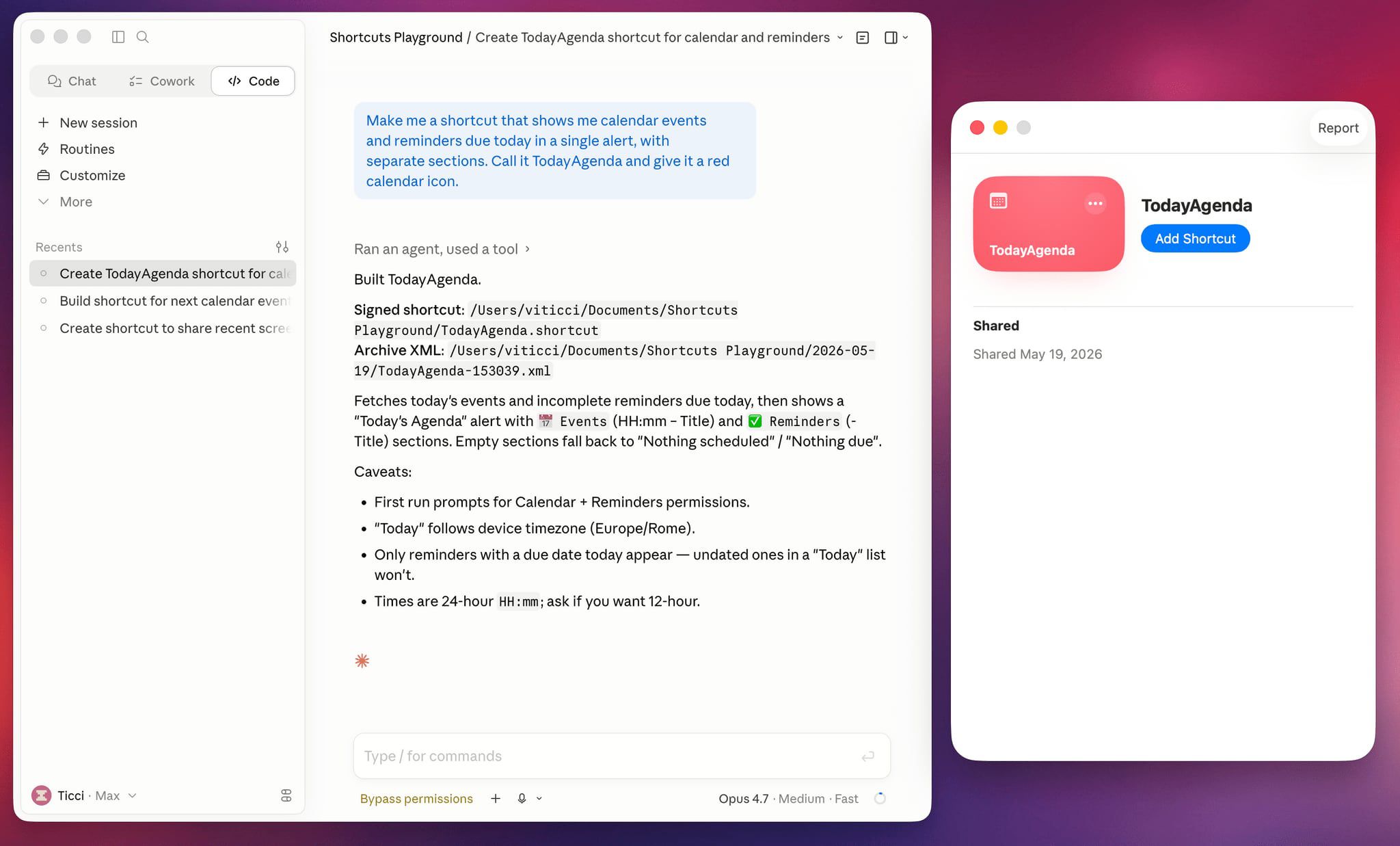
Shortcuts Playground is a groundbreaking plugin designed for integration with AI platforms like Claude Code and OpenAI Codex. This tool empowers users to generate custom shortcuts for Apple’s Shortcuts app through simple natural language inputs. By entering a concise description of the desired shortcut, users can receive a fully functional version ready for deployment on their devices within minutes.
Key Features and Functionality
– Natural Language Processing: Users can describe the functionality they need in plain language, and the AI interprets and constructs the corresponding shortcut.
– Seamless Integration: Once generated, shortcuts are output to Finder, facilitating easy installation into the Shortcuts app on iPhone, iPad, or Mac.
– Open Source Accessibility: Viticci has made Shortcuts Playground freely available on GitHub, complete with comprehensive documentation. This transparency allows users to understand the tool’s workings and customize it to their preferences.
Getting Started with Shortcuts Playground
To begin utilizing Shortcuts Playground:
1. Installation: Provide Claude Code or OpenAI Codex with the GitHub repository link. The AI agent will locate and install the plugin from the marketplace.
2. Shortcut Creation: Input a brief description of the desired shortcut. The AI processes this input and generates the corresponding shortcut.
3. Deployment: The generated shortcut is saved to Finder, ready for installation into the Shortcuts app.
Examples of AI-Generated Shortcuts
Viticci has showcased several practical applications of Shortcuts Playground:
– Parking Locator: A shortcut that records the location of a parked car and provides guidance back to it.
– Night Mode Settings: A shortcut that adjusts display settings for nighttime use and activates a Focus mode to minimize distractions.
Enhanced Access for Club MacStories Members
Subscribers to Club MacStories+ and Premier tiers have the added benefit of accessing Shortcuts Playground as a generative shortcut. This feature allows for the creation and direct installation of new shortcuts across devices, including iPhone, iPad, and Mac, streamlining the automation process even further.
Expanding the Shortcuts Archive
In conjunction with the launch of Shortcuts Playground, MacStories has unveiled a redesigned Shortcuts Archive. This extensive repository now boasts over 400 pre-built shortcuts, catering to a wide array of user needs and serving as a valuable resource for those seeking ready-made automation solutions.
Looking Ahead: AI Integration in iOS 27
The introduction of Shortcuts Playground comes at a pivotal time, as Apple is rumored to be integrating AI capabilities into the Shortcuts app with the upcoming iOS 27 release. This development is expected to enable users to create shortcuts through natural language commands, marking a significant advancement in user-friendly automation. While this feature is on the horizon, Shortcuts Playground offers an immediate and robust alternative for users eager to explore AI-driven shortcut creation today.
Conclusion
MacStories’ Shortcuts Playground represents a significant leap forward in the realm of digital automation. By harnessing the power of AI, it simplifies the process of creating custom shortcuts, making automation more accessible to a broader audience. Whether you’re a seasoned Shortcuts user or new to the concept, Shortcuts Playground provides a user-friendly platform to enhance productivity and streamline daily tasks.