Chrome for iPhone Enhances Shared Tab Notifications with Lock Screen Alerts
Google is actively testing a new feature in its Chrome browser for iPhone that aims to improve the visibility of shared tabs by utilizing iOS Lock Screen notifications. This development is designed to ensure that users are promptly alerted when a tab is sent from another device, enhancing the seamless integration between devices.
Current Tab Sharing Mechanism
Chrome’s existing tab-sharing functionality allows users to send web pages between devices where they are signed in with the same Google account. While this feature is convenient, the notifications for received tabs on iPhones have been subtle, often leading users to overlook them. Typically, these shared tabs appear within the browser without any prominent alert, requiring users to manually check for new tabs.
Introduction of Lock Screen Notifications
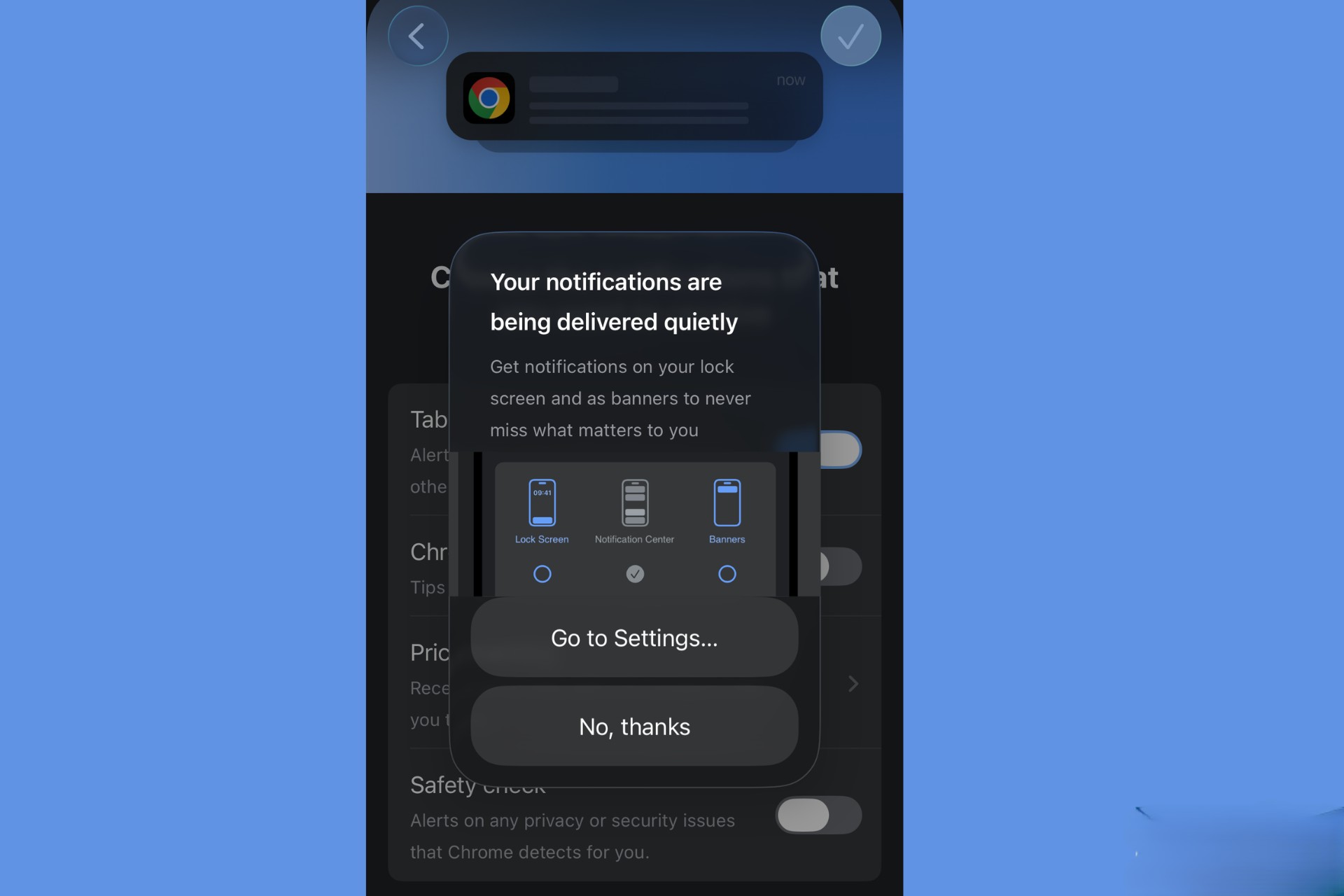
The latest update introduces a Tabs notification category within Chrome’s settings on iPhone. This addition enables users to receive standard iOS notifications when a tab is sent from another device. By integrating with the iOS notification system, Chrome ensures that these alerts are more noticeable, appearing directly on the Lock Screen and in the Notification Center.
User Experience Enhancements
Upon receiving a shared tab, users will see a notification on their Lock Screen, allowing them to access the tab with a single tap. This streamlined process eliminates the need to navigate through the browser to find the shared content, thereby saving time and improving efficiency.
Configuration and Customization
To activate this feature, users should navigate to Chrome’s in-app notification settings on their iPhone and enable the Tabs option. Additionally, it’s essential to ensure that Chrome is permitted to display Lock Screen alerts within the iOS system settings. This dual configuration guarantees that notifications function as intended.
Additional Notification Categories
Alongside the Tabs category, Chrome has introduced other notification options, including Price Tracking, Safety Check, and Chrome Tips. These categories aim to provide users with timely and relevant information, further enhancing the browsing experience.
Current Status and Future Rollout
While the feature is currently in the testing phase and available to TestFlight users, some inconsistencies have been observed in the triggering of notifications. This suggests that Google is still refining the functionality. The company has not yet announced a specific timeline for the public release of this feature.
Implications for Cross-Device Browsing
For users who frequently switch between devices, such as moving from a desktop to an iPhone, this enhancement promises a more cohesive browsing experience. By making shared tabs more prominent through Lock Screen notifications, Chrome reduces the chances of users missing important content, thereby facilitating smoother transitions between devices.
Conclusion
Google’s initiative to integrate Lock Screen notifications for shared tabs in Chrome for iPhone reflects a commitment to improving user experience and cross-device functionality. As this feature progresses through testing, it holds the potential to significantly enhance the way users interact with shared content across their devices.