ClickFix Campaigns Exploit Fake AI Tool Installers to Distribute MacSync Infostealer on macOS
Cybersecurity researchers have identified a series of ClickFix campaigns that are actively distributing the MacSync information stealer malware to macOS users. These campaigns employ sophisticated social engineering tactics, leveraging fake AI tool installers to deceive users into executing malicious commands.
Understanding ClickFix Campaigns
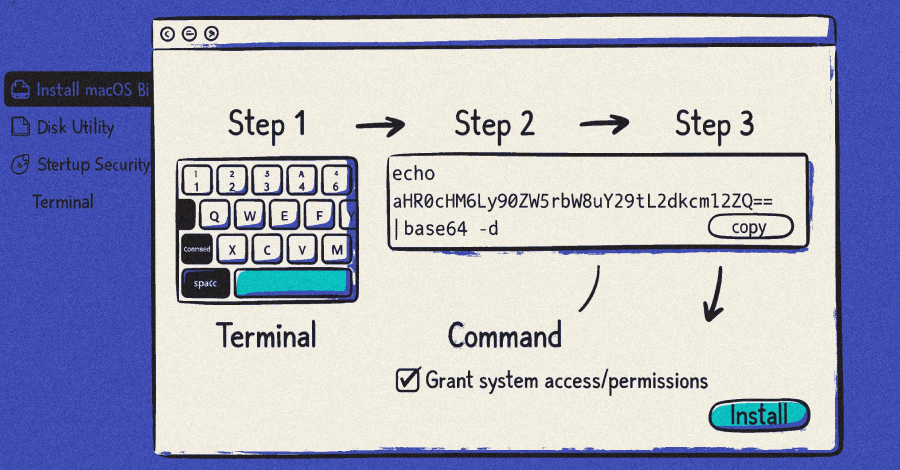
ClickFix is a social engineering technique that manipulates users into copying and executing commands in their terminal, leading to malware installation. Unlike traditional exploits that rely on software vulnerabilities, ClickFix attacks depend entirely on user interaction, making them particularly effective against individuals who may not fully understand the risks associated with executing unknown terminal commands.
Recent Campaigns Distributing MacSync
Three notable ClickFix campaigns have been observed distributing the MacSync infostealer:
1. November 2025 Campaign: This campaign utilized the lure of an OpenAI Atlas browser, promoted through sponsored search results on Google. Users searching for AI tools were directed to a counterfeit Google Sites page featuring a download button. Clicking this button presented instructions to open the Terminal app and paste a provided command. Executing this command downloaded a shell script that prompted users for their system password, subsequently installing MacSync with user-level permissions.
2. December 2025 Campaign: In this instance, attackers leveraged malvertising techniques targeting users searching for terms like how to clean up your Mac on Google. Victims were led to shared conversations on the legitimate OpenAI ChatGPT site, lending an air of credibility. These conversations redirected users to malicious GitHub-themed landing pages, where they were tricked into running harmful commands in the Terminal app.
3. February 2026 Campaign: This campaign targeted users in Belgium, India, and regions across North and South America. It introduced a new variant of MacSync delivered through ClickFix lures. This iteration featured dynamic AppleScript payloads and in-memory execution, tactics designed to evade static analysis, bypass behavioral detections, and complicate incident response efforts.
Technical Details of the Attack
The attack sequence typically unfolds as follows:
– User Interaction: The victim encounters a fake AI tool installer, often through a sponsored search result or a deceptive website.
– Execution of Malicious Command: The user is instructed to open the Terminal app and paste a command, which they believe is necessary to install the desired tool.
– Shell Script Deployment: Executing the command downloads a shell script that prompts the user for their system password, granting the script elevated privileges.
– Malware Installation: The shell script contacts a hard-coded server to retrieve the MacSync payload, which is then installed on the system.
Capabilities of MacSync
Once installed, MacSync is capable of:
– Credential Theft: Harvesting login credentials stored on the compromised system.
– File Exfiltration: Accessing and transmitting files from the victim’s machine to the attacker’s server.
– Keychain Access: Extracting data from the macOS Keychain, which may include sensitive information such as passwords and certificates.
– Cryptocurrency Theft: Stealing seed phrases from cryptocurrency wallets, potentially leading to financial loss.
Evolving Tactics and Implications
The evolution of these campaigns indicates that threat actors are continually refining their methods to bypass security measures and exploit user trust. By masquerading as legitimate AI tools and leveraging platforms like ChatGPT conversations, attackers increase the likelihood of deceiving users into executing malicious commands.
The latest variant of MacSync observed in the February 2026 campaign suggests that malware developers are adapting to operating system and software security enhancements to maintain the effectiveness of their attacks. This underscores the need for continuous vigilance and adaptation in cybersecurity practices.
Recommendations for Users
To mitigate the risk of such attacks, users are advised to:
– Exercise Caution with Terminal Commands: Avoid executing commands from unverified sources, especially those instructing you to use the Terminal app.
– Verify Software Sources: Download software only from official and reputable sources. Be wary of sponsored search results that may lead to malicious sites.
– Stay Informed: Keep abreast of the latest cybersecurity threats and tactics to recognize and avoid potential scams.
– Implement Security Measures: Utilize comprehensive security solutions that can detect and prevent malware infections.
By remaining vigilant and adopting proactive security practices, users can protect themselves against the evolving landscape of cyber threats targeting macOS systems.