KiiBoom Cybrix 29 Review: Compact Design Meets Versatile Functionality
In the expansive realm of third-party keyboards, the KiiBoom Cybrix 29 emerges as a distinctive contender, offering a compact yet highly functional solution for both Mac and Windows users. This 29-key macropad, complemented by three customizable knobs, is engineered to enhance productivity and gaming experiences alike.
Design and Build Quality
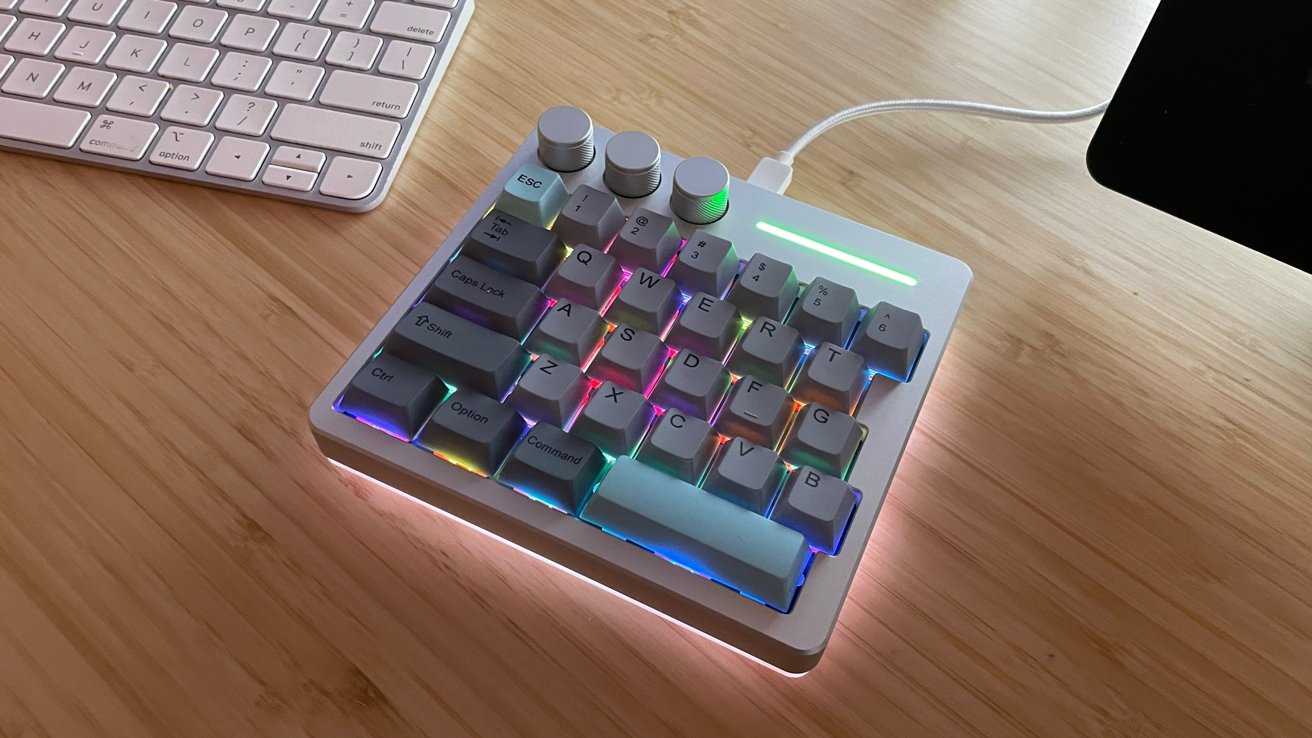
The Cybrix 29 boasts a robust construction, featuring a CNC-machined aluminum and acrylic case that exudes durability and a sleek aesthetic. Its compact dimensions (150mm x 34mm x 30mm) and weight of 0.42kg make it a space-efficient addition to any workspace. Available in three color schemes—Black (with white, orange, and black keycaps), Silver (with grey and blue keycaps), and Pink (with light pink keycaps)—the Cybrix 29 caters to diverse personal preferences. The inclusion of rubber gripper pads on the underside ensures stability during intense use, a thoughtful touch for gaming enthusiasts.
Key Features and Specifications
– Layout and Connectivity: The device comprises 29 keys and three knobs, connected via USB-C to USB-A, ensuring a reliable wired connection.
– Materials: Constructed with a CNC aluminum and acrylic case and an FR4 plate, the Cybrix 29 is built for longevity.
– Switches and Keycaps: Equipped with hot-swappable KiiBoom Duskrise switches and Cherry profile dye-sublimated PBT keycaps, users can customize their typing experience.
– Performance: With a polling rate of up to 8000Hz and NKRO anti-ghosting, the macropad delivers responsive and accurate input.
– Compatibility: Designed for both Windows and macOS, it includes alternate keycaps for Mac users, ensuring seamless integration.
– Backlighting: South-facing RGB LEDs beneath the keycaps, along with additional LEDs on the bottom, provide vibrant and customizable lighting effects.
Customization and Software
KiiBoom offers dedicated macOS software that facilitates extensive customization of the Cybrix 29. Users can remap keys, assign macros, adjust knob functions, and personalize RGB lighting to suit their workflow or gaming setup. For those who prefer not to install additional software, basic functionality adjustments can be made using the Function key in combination with other keys.
User Experience
Setting up the Cybrix 29 is straightforward. Upon connecting it to a Mac Studio via the provided USB cable, the device is ready for immediate use. The macOS driver enhances the experience by allowing deep customization. However, users may encounter the software defaulting to Chinese upon initial launch; this can be remedied by selecting the language option next to the globe icon within the application.
In gaming scenarios, the Cybrix 29 performs admirably. Its responsiveness and stability make it suitable for various game genres, from fast-paced action titles to role-playing games. The tactile feedback of the Duskrise switches, coupled with the satisfying thok sound, enhances the overall gaming experience.
Beyond gaming, the Cybrix 29 proves valuable in creative workflows. For instance, when paired with a drawing tablet, it can be programmed with essential shortcuts, streamlining tasks and improving efficiency. While it doesn’t replace a full-sized keyboard for extensive typing, it serves as an excellent auxiliary device for specific functions.
Considerations
Despite its many strengths, the Cybrix 29 has a couple of limitations:
1. Wired Connectivity Only: The absence of a wireless option means an additional cable on the desk, which might be a drawback for users seeking a cleaner setup.
2. Right-Hand Dominance: Currently, the Cybrix 29 is designed for right-handed users, with no left-handed version available.
Conclusion
The KiiBoom Cybrix 29 stands out as a well-crafted, versatile macropad that caters to both gamers and professionals seeking to enhance their productivity. Its solid build, extensive customization options, and compatibility with macOS and Windows make it a worthy investment at its price point of $89.99. While the lack of wireless connectivity and left-handed configuration may deter some, the overall performance and design quality of the Cybrix 29 make it a commendable addition to any tech setup.
Pros:
– Exceptional build quality
– Includes keycaps for both Mac and Windows users
– Comprehensive macOS software for customization
– Compact and space-saving design
Cons:
– Limited to wired connectivity
– No left-handed version available
Rating: 4 out of 5
Where to Buy:
The KiiBoom Cybrix 29 is available for purchase on the KiiBoom online shop and Amazon for $89.99.