Enhancing MacBook Battery Longevity: Introducing the Charge Limit Slider in macOS Tahoe 26.4
In a significant update aimed at extending the lifespan of MacBook batteries, Apple has introduced a new feature in macOS Tahoe 26.4: the Charge Limit Slider. This addition allows users to set a maximum charge percentage for their MacBook’s battery, a functionality previously available on iPhones and iPads.
Background on Battery Health Management
Battery health is a critical aspect of device longevity. Overcharging or consistently charging a battery to its full capacity can accelerate wear and reduce its overall lifespan. Recognizing this, Apple has progressively introduced features to help users manage and maintain battery health across its device lineup.
Evolution of Battery Management Features
– iPhone and iPad: With the release of the iPhone 15 series, Apple introduced an opt-in setting that limited battery charging to 80%, aiming to preserve battery health over time. This feature was further enhanced in iOS 18, allowing users to set charging limits anywhere between 80% and 100%.
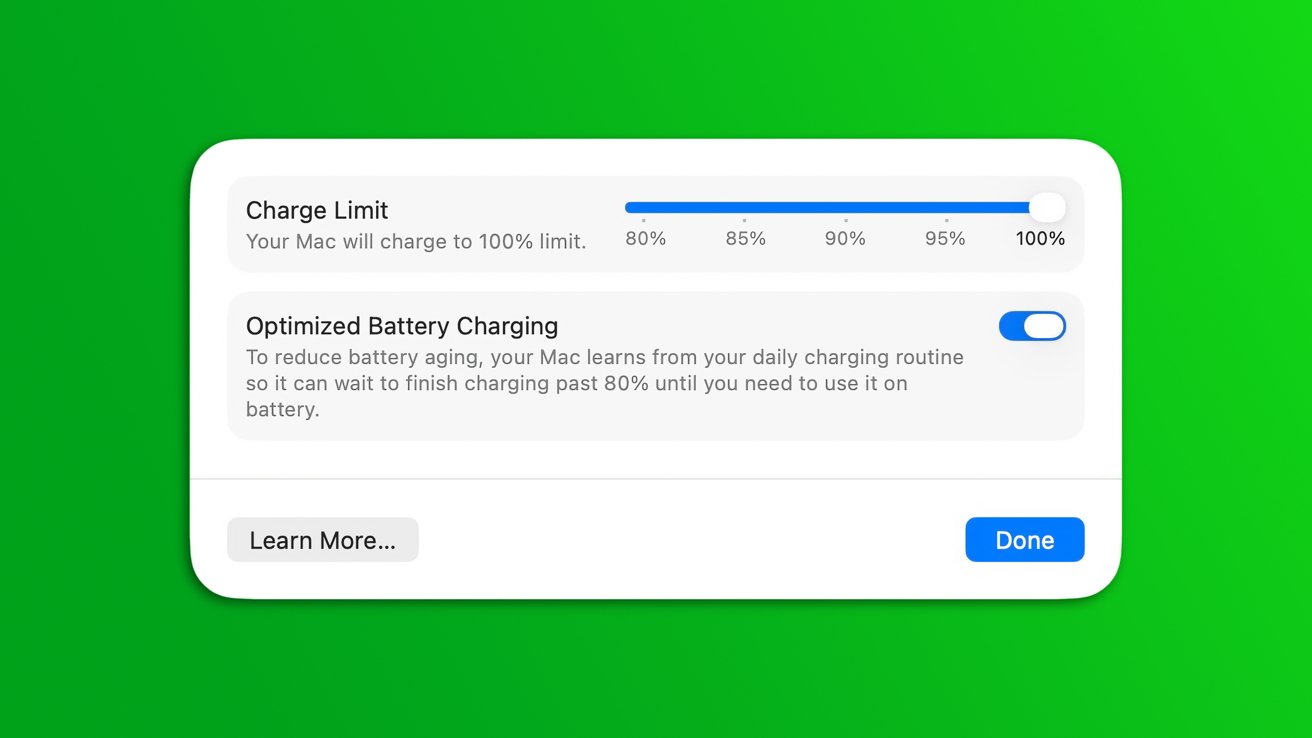
– MacBook: Prior to macOS Tahoe 26.4, MacBooks had limited options for battery health management. Users could enable Optimized Battery Charging, which learned daily charging routines to reduce the time the battery spent fully charged. However, this feature lacked the flexibility to set specific charge limits.
Introducing the Charge Limit Slider in macOS Tahoe 26.4
The latest macOS update brings the Charge Limit Slider to MacBooks, providing users with greater control over their device’s charging behavior.
How to Access and Use the Charge Limit Slider:
1. Open System Settings: Click on the Apple menu and select System Settings.
2. Navigate to Battery Settings: In the sidebar, click on Battery.
3. Access Charging Options: Click on the information symbol next to the Charging option.
4. Set Charge Limit: Use the slider to select your desired maximum charge percentage.
By setting a charge limit, users can prevent their MacBook from charging beyond a specified percentage, thereby reducing battery wear and potentially extending its lifespan.
Integration with Shortcuts App
In addition to manual settings, the Charge Limit feature is integrated into the built-in Shortcuts app in both iOS 26.4 and macOS 26.4. This integration allows users to automate and customize their charging preferences based on specific conditions or routines.
Considerations for Users
While the Charge Limit Slider offers a proactive approach to battery health management, its effectiveness depends on individual usage patterns:
– Stationary Users: Those who primarily use their MacBook plugged in may benefit from setting a lower charge limit to reduce battery wear.
– Mobile Users: Users who frequently rely on battery power might prefer a higher charge limit to ensure sufficient battery life throughout the day.
Conclusion
The introduction of the Charge Limit Slider in macOS Tahoe 26.4 marks a significant step in Apple’s commitment to device longevity and user customization. By providing tools to manage battery charging, Apple empowers users to make informed decisions that align with their usage habits and battery health priorities.