Enhancing MacBook Longevity: macOS 26.4 Introduces Charge Limit Feature
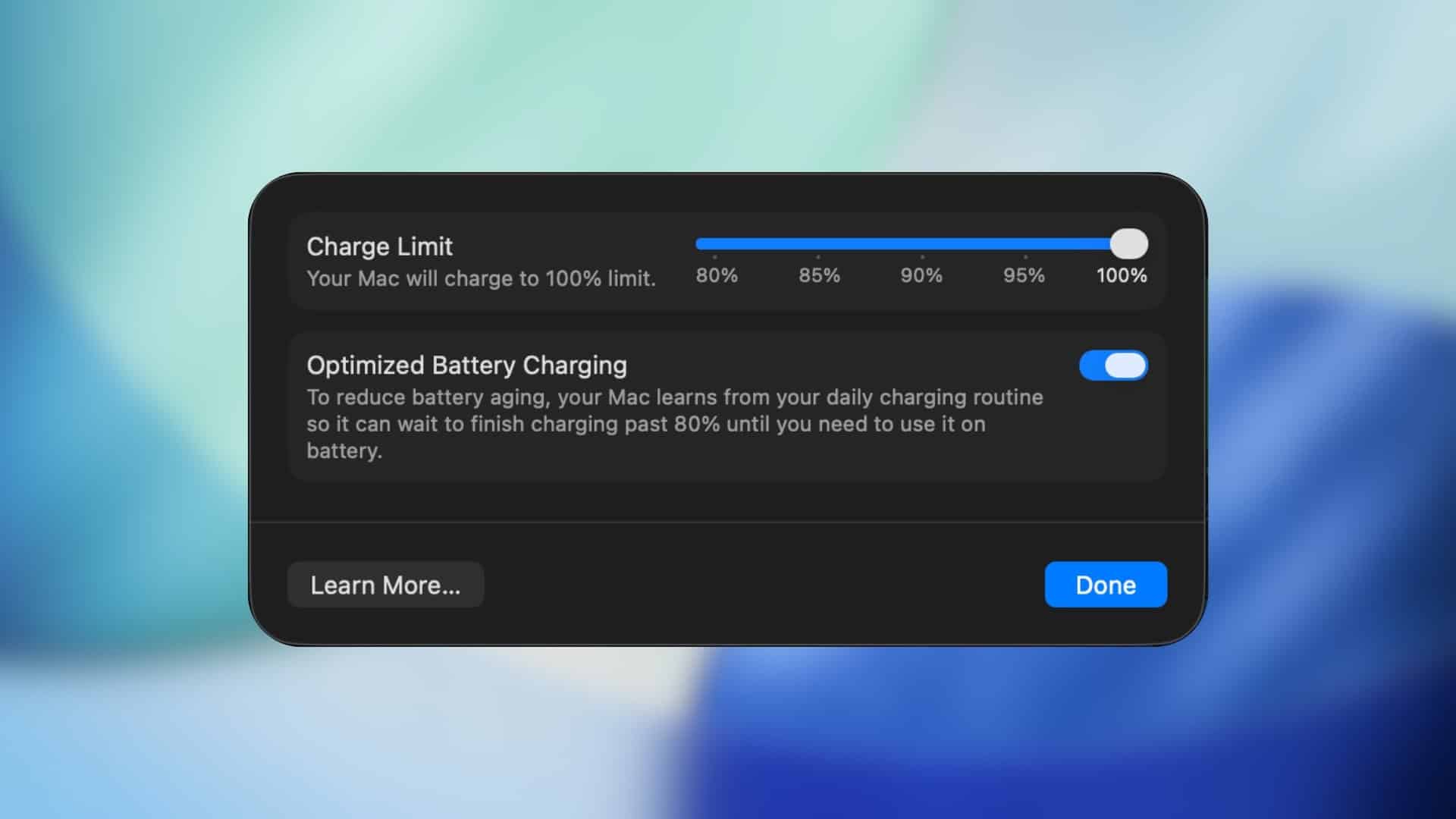
Apple has unveiled a significant enhancement in its latest macOS 26.4 update: the Charge Limit feature. This addition empowers MacBook users to set a maximum battery charge level, aiming to prolong battery lifespan and optimize device performance.
Understanding the Charge Limit Feature
Traditionally, MacBooks charge their batteries to full capacity when connected to power. However, maintaining a battery at 100% charge for extended periods can accelerate its degradation. The Charge Limit feature addresses this by allowing users to specify a maximum charge threshold between 80% and 100%. Once the battery reaches this set limit, charging ceases, thereby reducing the chemical stress on the battery and potentially extending its overall health.
Benefits for Stationary Users
This feature is particularly advantageous for individuals who predominantly use their MacBooks in stationary setups, such as at a desk with continuous power supply. In such scenarios, the device remains plugged in for prolonged durations, which can strain the battery over time. By capping the charge, users can mitigate this strain, ensuring the battery remains in optimal condition even with constant power connection.
Integration with Shortcuts for Automation
To enhance user convenience, Apple has integrated the Charge Limit feature with the Shortcuts app. This integration allows for the automation of charging preferences based on specific triggers like time, location, or usage patterns. For instance:
– Work Environment: Set the charge limit to 80% upon arriving at the office.
– Travel Preparation: Allow charging to 100% before planned travel days.
– Nighttime Routine: Reduce the charge limit during overnight hours.
– Weekend Usage: Increase the charge limit for extended use during weekends.
Such automation ensures that the device adapts to the user’s routine without the need for manual adjustments, offering a seamless experience.
Occasional Full Charges for Calibration
Apple has noted that the system will occasionally allow the battery to charge to 100% to maintain accurate battery state-of-charge estimates. This periodic full charge ensures that the battery’s calibration remains precise, providing users with reliable battery percentage readings.
Implications for Different User Profiles
The introduction of the Charge Limit feature is a boon for users who keep their MacBooks plugged in for most of the day, such as professionals working at a desk or students studying at home. By preventing the battery from remaining at full charge continuously, these users can significantly slow down battery wear and preserve its long-term health.
Conversely, users who frequently rely on their MacBooks’ portability and require maximum battery capacity for extended periods can adjust the charge limit accordingly. The flexibility of this feature allows it to cater to diverse user needs, balancing battery health with usage requirements.
Conclusion
The Charge Limit feature in macOS 26.4 represents Apple’s commitment to enhancing device longevity and user experience. By providing users with control over their battery charging habits and integrating intelligent automation, Apple ensures that MacBooks remain reliable companions for both stationary and mobile users. This proactive approach to battery management underscores the importance of adapting technology to user lifestyles, ultimately leading to more sustainable and efficient device usage.