macOS 26.4 Introduces Battery Charge Limit and Enhanced Shortcuts Integration
Apple’s latest update, macOS 26.4, brings significant enhancements aimed at improving user experience and device longevity. Among the standout features are the introduction of the Battery Charge Limit and expanded capabilities within the Shortcuts app.
Battery Charge Limit on Mac
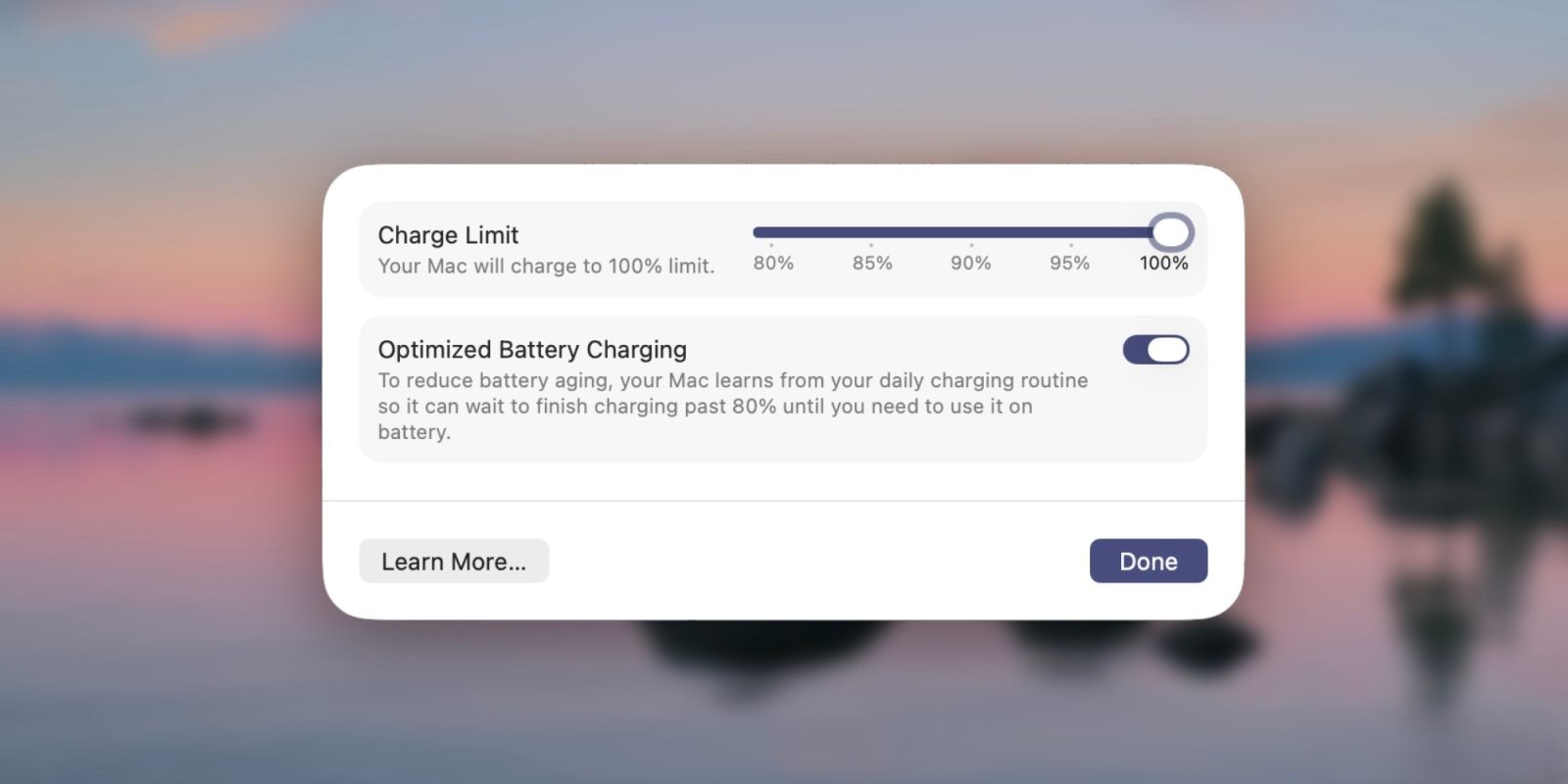
The Battery Charge Limit feature, previously exclusive to iPhones and iPads, is now available for Mac users with the release of macOS 26.4. This functionality allows users to set a maximum charge level for their MacBook’s battery, ranging between 80% and 100%. By capping the charge, users can reduce the wear on the battery, potentially extending its lifespan.
To activate this feature:
1. Open System Settings.
2. Navigate to the Battery section.
3. Click on the information icon next to Charging.
4. Set your desired maximum charge percentage.
Once enabled, the Mac will cease charging when it reaches the specified limit, typically within a few percentage points. It’s important to note that, occasionally, the device may charge to 100% to maintain accurate battery state-of-charge estimates.
Integration with Shortcuts
In addition to manual settings, macOS 26.4 enhances automation by integrating the Battery Charge Limit feature into the Shortcuts app. This integration empowers users to create custom automations that adjust the charge limit based on specific conditions or routines. For instance, users can set the charge limit to 80% during regular use and allow a full charge when preparing for extended periods away from a power source.
To create a shortcut for adjusting the charge limit:
1. Open the Shortcuts app.
2. Click on the + icon to create a new shortcut.
3. Search for the Set Battery Charge Limit action.
4. Add the action to your shortcut and specify the desired charge percentage.
5. Save and name your shortcut.
This feature is particularly beneficial for users who frequently use their MacBooks in stationary setups, such as at a desk, where the device remains plugged in for extended periods. By managing the charge limit, users can optimize battery health without compromising on convenience.
Additional Enhancements in macOS 26.4
Beyond the Battery Charge Limit and Shortcuts integration, macOS 26.4 introduces several other improvements:
– Spotlight Enhancements: Spotlight search now offers faster and more relevant results, utilizing on-device intelligence to surface the most pertinent files, apps, and actions based on user context. This includes recent activities, daily routines, and even clipboard contents.
– System and App Actions: Users can now perform system and app-specific actions directly from Spotlight. This includes creating calendar events, sending emails or messages, starting timers, playing podcasts, and running shortcuts, all without leaving the keyboard or switching apps.
– Quick Keys: macOS 26.4 introduces Quick Keys, allowing users to assign short character strings as keyboard shortcuts for frequent actions. For example, typing sm can send a message, while ar adds a reminder. These Quick Keys are generated automatically based on user usage patterns.
– Clipboard History: Spotlight now includes a clipboard history feature, enabling users to search and browse previously copied items, including text, links, and images. This addition enhances productivity by providing quick access to past clipboard contents.
– Shortcuts and Apple Intelligence Integration: The Shortcuts app gains deeper integration with Apple Intelligence, allowing users to trigger custom shortcuts that leverage AI capabilities. For instance, users can create a shortcut that generates AI-powered suggestions based on clipboard content.
Conclusion
The macOS 26.4 update marks a significant step forward in enhancing user control and device longevity. The introduction of the Battery Charge Limit feature, coupled with its integration into the Shortcuts app, provides users with powerful tools to manage their MacBook’s battery health proactively. Additionally, the various enhancements to Spotlight and system actions contribute to a more efficient and personalized user experience.
As Apple continues to refine its operating system, users can look forward to more features that prioritize both functionality and device longevity. The macOS 26.4 update exemplifies this commitment, offering practical solutions to everyday challenges faced by Mac users.