Elite Users Struggle with iPhone’s Call Screening Feature
In the realm of high-powered professionals, immediate and uninterrupted communication is paramount. However, a recent development has left many affluent individuals perplexed: the Call Screening feature introduced in Apple’s iOS 26. This tool, designed to combat the surge of spam calls, has inadvertently become a hurdle for those unacquainted with its functionalities.
Understanding Call Screening in iOS 26
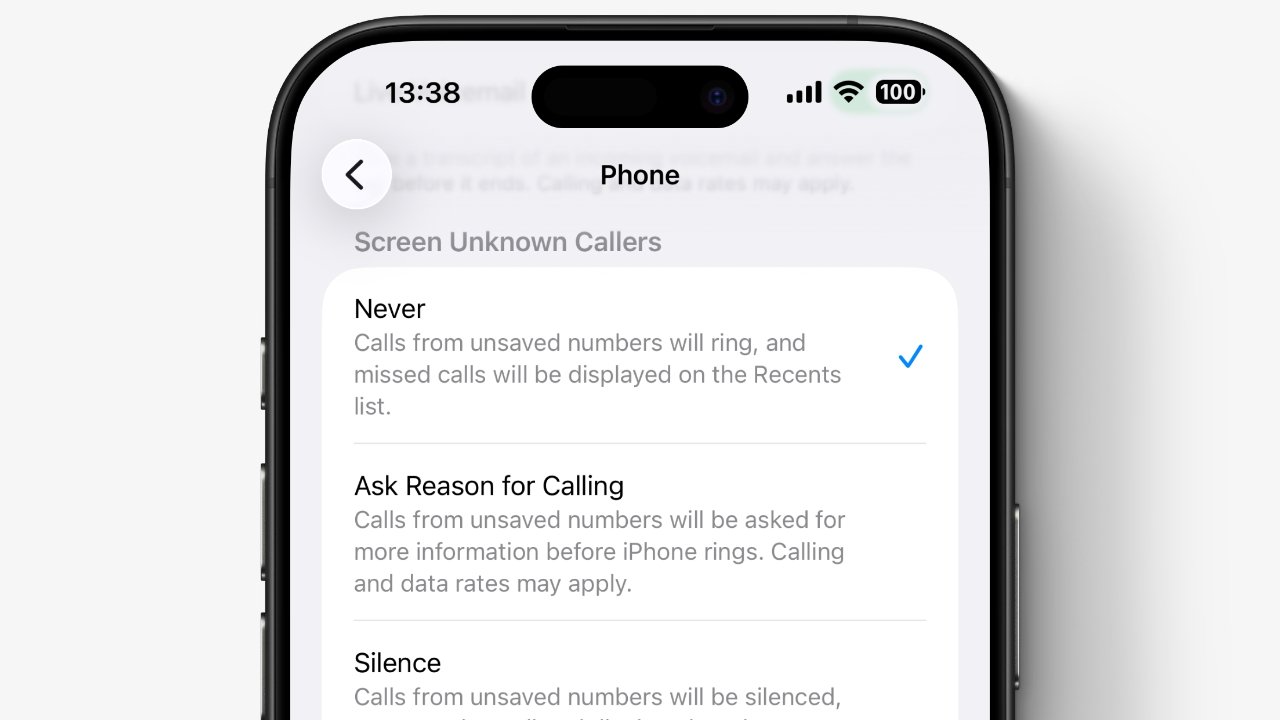
With the release of iOS 26, Apple aimed to enhance user experience by mitigating the nuisance of unsolicited calls. The Call Screening feature offers users three distinct settings:
1. Never: Disables call screening entirely, allowing all calls to come through as usual.
2. Ask Reason for Calling: Siri intercepts incoming calls from unknown numbers, inquiring about the caller’s identity and purpose before notifying the user.
3. Silence: Automatically silences calls from unknown numbers, directing them straight to voicemail without any notification.
By default, the Call Screening feature is set to Never, ensuring that users receive all calls unless they choose to modify this setting.
The Dilemma Among the Affluent
Despite the default setting being off, reports have emerged of high-profile individuals, particularly in the legal sector, missing crucial calls. This phenomenon has been highlighted by the Wall Street Journal, noting that some elite users are unaware of the feature’s existence or how to adjust its settings.
The irony lies in the simplicity of the solution. To ensure all calls are received without screening:
1. Open the Settings app.
2. Scroll down and select Phone.
3. Tap on Screen Unknown Callers.
4. Choose the Never option.
This straightforward adjustment ensures that all incoming calls, regardless of the caller’s identity, will ring through as intended.
The Broader Implications
The introduction of Call Screening is a response to the escalating issue of spam calls, exacerbated by advancements in AI that enable voice impersonation. For the general populace, this feature is a boon, reducing interruptions and potential scams.
However, for professionals who rely on prompt communication, especially from unknown numbers, the feature can be a double-edged sword. The key lies in awareness and customization. By understanding and adjusting the settings to fit individual needs, users can strike a balance between security and accessibility.
Conclusion
Technology’s rapid evolution often brings about features designed for the greater good, but they can sometimes overlook the nuances of specific user groups. The Call Screening feature in iOS 26 is a testament to this, offering protection against spam while inadvertently causing disruptions for some. The solution, however, is within reach: a simple settings adjustment can bridge the gap between innovation and user convenience.