Cybercriminals Exploit ‘rn’ Typo to Mimic Microsoft and Marriott in Sophisticated Phishing Attacks
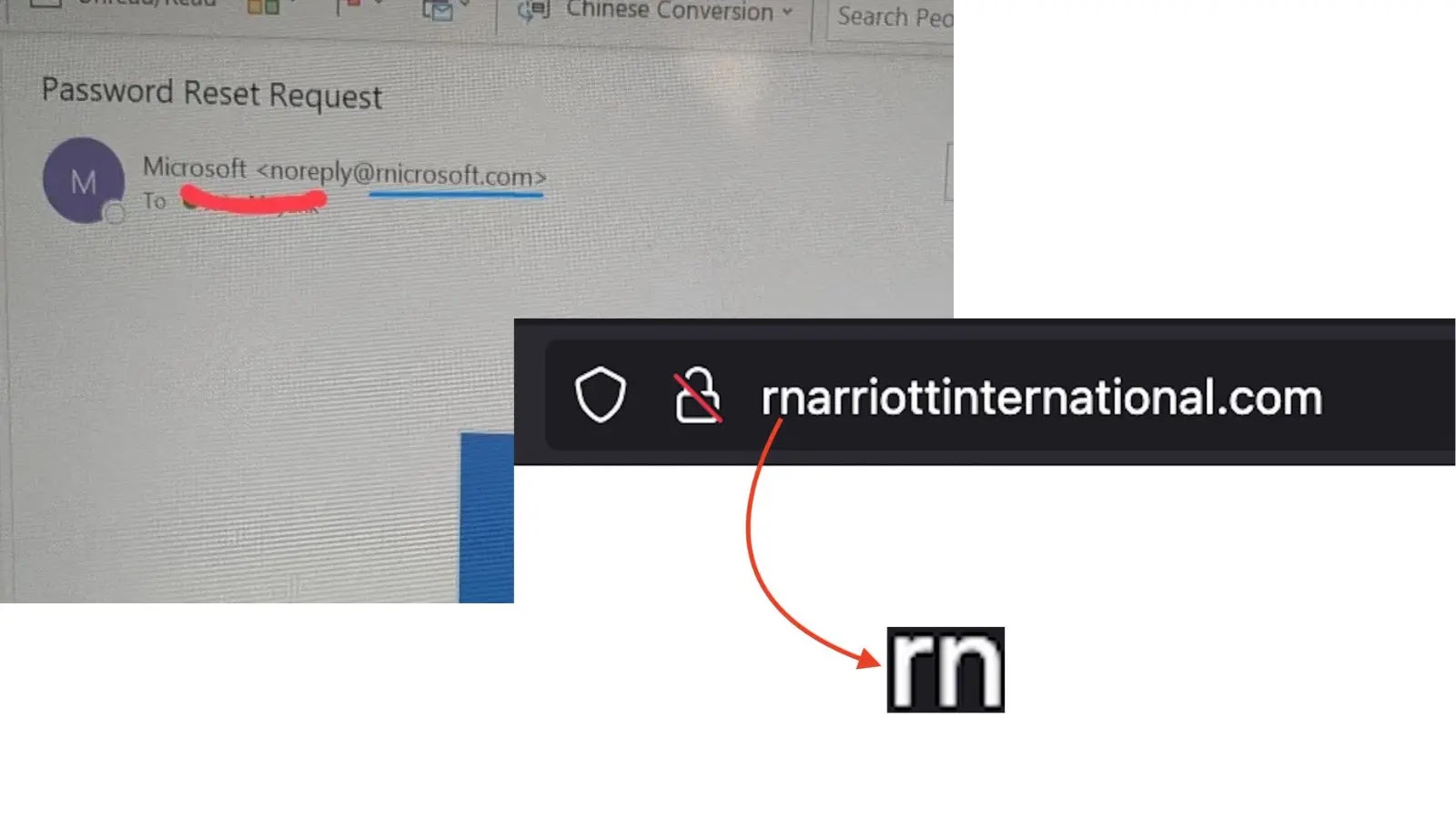
In a recent wave of cyberattacks, threat actors have employed a deceptive technique known as homoglyph or typosquatting to impersonate major corporations like Microsoft and Marriott International. By substituting the letter m with the combination rn (r + n), attackers create counterfeit domains that closely resemble legitimate ones, thereby tricking users into divulging sensitive information.
Understanding the ‘rn’ Typo Technique
This method exploits the visual similarity between the letters r and n placed together (rn) and the letter m. In many typefaces, especially on digital screens, this combination can be nearly indistinguishable from the letter m. Cybercriminals leverage this typographical nuance to craft URLs that appear authentic at a glance.
Recent Phishing Campaigns Targeting Major Corporations
Marriott International Impersonation
Security firm Netcraft has identified a series of malicious domains designed to mimic Marriott International. These domains are likely intended to harvest loyalty account credentials or personal guest data. Notable examples include:
– `rnarriottinternational.com`
– `rnarriotthotels.com`
In these instances, the attackers replace the m in Marriott with rn, creating domains that, at a quick glance, appear legitimate.
Microsoft User Targeting
Similarly, campaigns have been observed targeting Microsoft users. Phishing emails from domains like `rnicrosoft.com` are used to send fraudulent security alerts or invoice notifications. These emails often replicate Microsoft’s branding, including logos and formatting, to enhance their credibility.
Indicators of Compromise (IOCs)
Security teams and users should be vigilant for the following malicious domains:
– `rnarriottinternational.com`
– `rnarriotthotels.com`
– `rnicrosoft.com`
– `micros0ft.com` (where the letter o is replaced with the numeral 0)
– `microsoft-support.com`
These domains employ various typosquatting techniques, such as character substitution and hyphenation, to deceive users.
Protective Measures Against Homoglyph Phishing Attacks
To safeguard against these sophisticated phishing attempts, consider the following strategies:
1. Examine Sender Addresses Carefully: On mobile devices, tap the sender’s name to view the full email address. Pay close attention to subtle character substitutions like rn for m.
2. Hover Over Links Before Clicking: On desktops, hover your mouse over hyperlinks to preview the actual URL. This practice can reveal discrepancies between the displayed link and its true destination.
3. Manually Enter URLs: If you receive an email prompting action regarding your account, avoid clicking embedded links. Instead, open your browser and type the official website address directly.
4. Utilize Password Managers: Password management tools can help detect fraudulent sites by recognizing discrepancies in domain names, thereby preventing automatic credential entry on unverified platforms.
By remaining vigilant and adopting these practices, individuals and organizations can better protect themselves against the evolving tactics of cybercriminals.