1Password Introduces Advanced Phishing Protection to Safeguard Users
In an era where cyber threats are increasingly sophisticated, 1Password has unveiled a new feature designed to bolster user security against phishing attacks. This enhancement, integrated into the 1Password browser extension, aims to alert users when they attempt to input credentials on potentially malicious websites.
Understanding the Threat Landscape
Phishing scams have evolved significantly, with cybercriminals employing advanced techniques to deceive users into divulging sensitive information. These fraudulent schemes often involve creating counterfeit websites that closely mimic legitimate ones, making it challenging for users to discern the difference. The rise of artificial intelligence has further supercharged these scams, enabling attackers to craft more convincing and targeted phishing attempts.
1Password’s Proactive Approach
Recognizing the escalating threat, 1Password has integrated a proactive warning system within its browser extension. This system is designed to detect discrepancies between the URL of the website a user is visiting and the URLs associated with their saved login credentials.
How the Feature Works
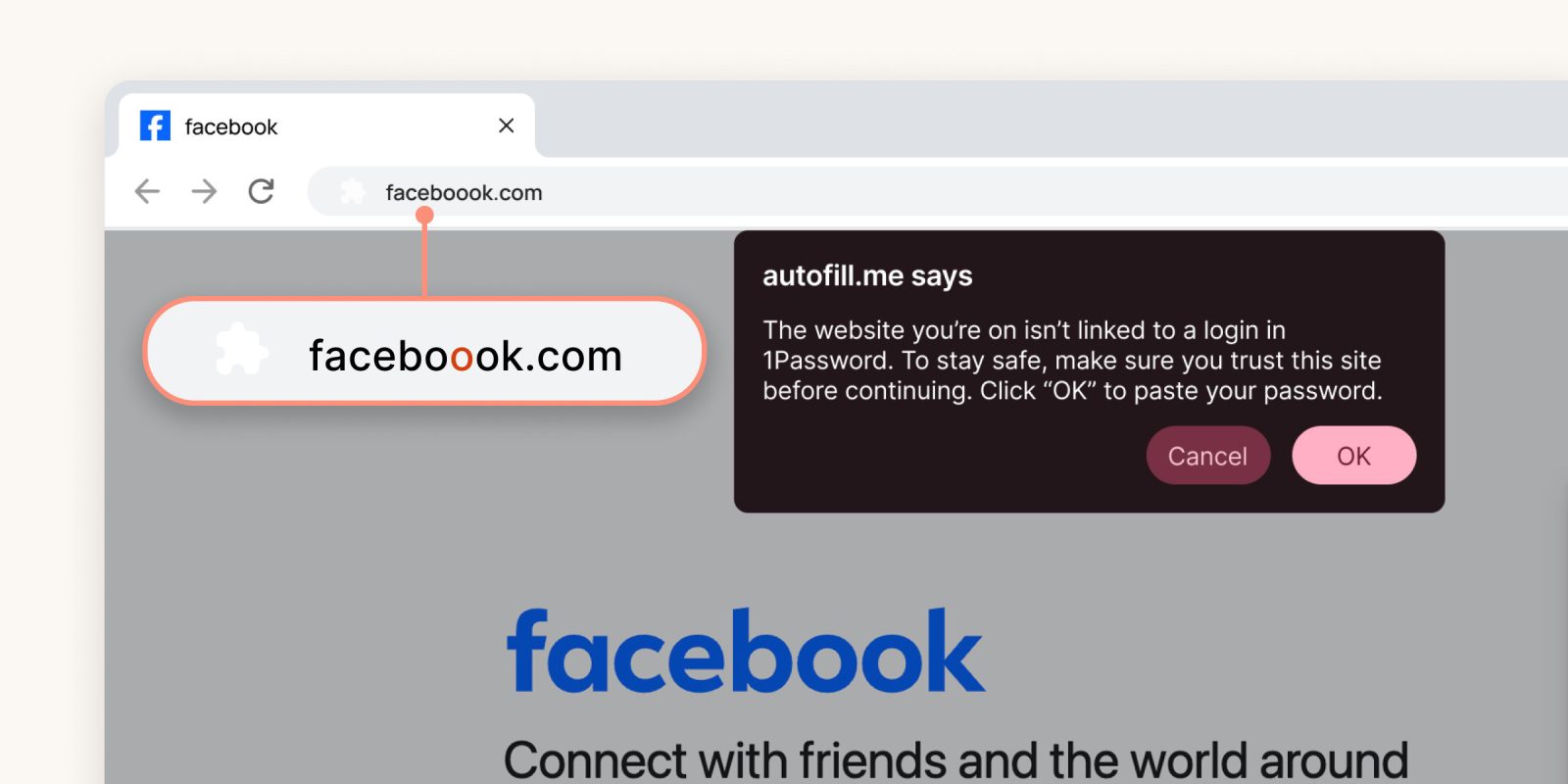
When a user navigates to a website, 1Password performs a real-time comparison between the site’s URL and the URLs stored in the user’s vault. If a mismatch is detected, the extension refrains from autofilling the login credentials. This initial step serves as a subtle alert to the user that something may be amiss.
However, understanding that users might manually copy and paste their credentials despite the absence of autofill, 1Password has added an additional safeguard. If a user attempts to paste their credentials into a site with a mismatched URL, a pop-up warning appears. This prompt encourages the user to pause and reconsider before proceeding, effectively acting as a tap on the shoulder to ensure they are aware of the potential risk.
Availability and User Control
This phishing protection feature is enabled by default for users on individual and family plans, ensuring immediate protection without the need for manual activation. For business users, the feature is available as an optional setting, allowing organizations to tailor security measures to their specific needs.
The Importance of Vigilance
While technological solutions like 1Password’s new feature significantly enhance security, user vigilance remains paramount. It’s essential for individuals to stay informed about common phishing tactics, regularly update their software, and adopt best practices for online security.
Conclusion
1Password’s introduction of advanced phishing protection underscores the company’s commitment to user security in an increasingly perilous digital landscape. By combining technological innovation with user awareness, individuals can better defend themselves against the ever-evolving tactics of cybercriminals.