EDRStartupHinder: A New Tool Disrupting Antivirus and EDR Services on Windows 11
In the ever-evolving landscape of cybersecurity, the development of tools designed to test and challenge security measures is both a boon and a bane. Security researcher TwoSevenOneT, renowned for creating EDR evasion tools such as EDR-Freeze and EDR-Redir, has recently introduced a new tool named EDRStartupHinder. This tool is engineered to obstruct antivirus and Endpoint Detection and Response (EDR) services during the startup phase of Windows 11 systems, specifically targeting the 25H2 Defender version.
Understanding EDRStartupHinder
EDRStartupHinder operates by redirecting critical System32 Dynamic Link Libraries (DLLs) using a Windows feature known as Bindlink. This method effectively disrupts the initialization of essential security services. The tool’s functionality was demonstrated on Windows Defender within the Windows 11 25H2 environment, showcasing its capability to interfere with the startup processes of security applications.
The Mechanism Behind the Tool
Antivirus and EDR services function similarly to standard Windows services but are fortified with additional protections provided by kernel drivers. These services operate under SYSTEM privileges, are configured to auto-start during the boot process, and utilize Protected Process Light (PPL) to prevent tampering from user-mode applications. This design ensures that any configuration changes attempted from user mode are unsuccessful, and the processes themselves are resistant to modifications without employing advanced techniques like those found in EDR-Freeze.
Disrupting Startup with Bindlink
Previous methods, such as EDR-Redir, focused on redirecting EDR folders after the system had started. However, security vendors have since implemented measures to harden their systems against such post-startup interventions. EDRStartupHinder takes a proactive approach by targeting the System32 directory, which is integral to all processes, including EDRs, during the system’s startup sequence.
The tool employs a series of steps to achieve its objective:
1. Service Creation with Higher Priority: EDRStartupHinder establishes a service with a higher priority level to ensure it executes before the targeted EDR services.
2. DLL Redirection via Bindlink: It utilizes Bindlink to redirect a core DLL to an unsigned, intentionally corrupted copy.
3. Leveraging PPL for Disruption: By exploiting the PPL mechanism, the tool causes the EDR service to crash upon loading the corrupted DLL.
4. Post-Termination Cleanup: After the EDR service has been terminated, EDRStartupHinder performs cleanup operations to remove traces of its activity.
Technical Insights and Implementation
The prioritization of services is informed by research into Bring Your Own Vulnerable Driver (BYOVD) techniques, specifically examining the `HKEY_LOCAL_MACHINE\SYSTEM\CurrentControlSet\Control\ServiceGroupOrder` registry key. Identifying DLLs that are not preloaded by the KnownDLLs list is crucial, a task that can be accomplished using tools like Process Monitor.
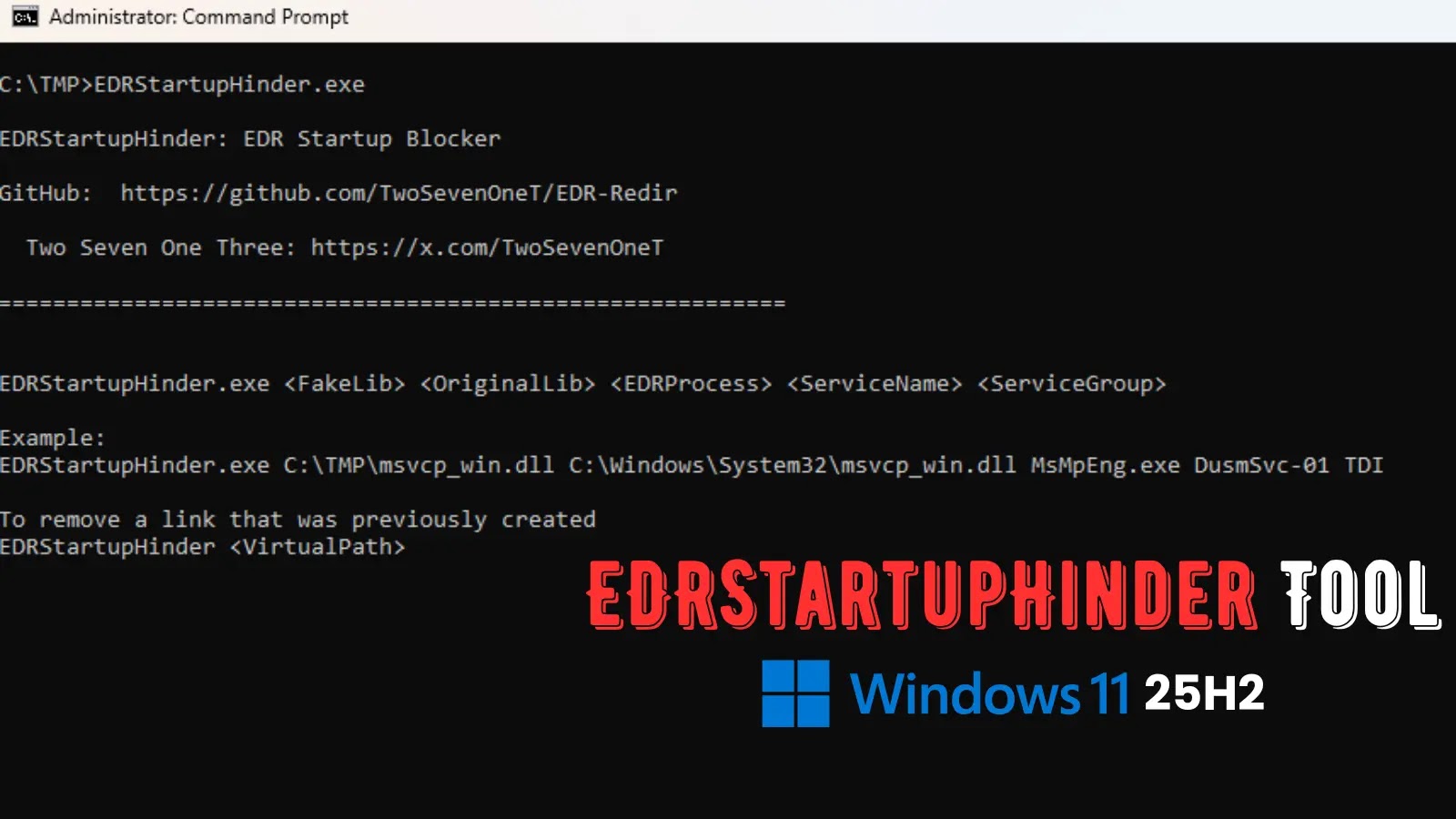
EDRStartupHinder is available on GitHub and accepts several parameters for customization:
– OriginalLib: The System32 DLL to be targeted.
– FakeLib: The location of the corrupted copy of the DLL.
– ServiceName/Group: The priority level of the service to be created.
– EDRProcess: The specific EDR process to be targeted, such as `MsMpEng.exe` for Windows Defender.
The tool operates by corrupting the Portable Executable (PE) header signature of the FakeLib, registering it as a service, monitoring for the launch of the EDR process, and dynamically applying and removing the Bindlink as needed. Users are advised to conduct thorough research into the specific DLLs and service groups associated with their target EDR systems, utilizing tools like Process Explorer to analyze boot logs.
Demonstration and Practical Application
In a controlled laboratory environment running Windows 11 25H2, EDRStartupHinder was tested by targeting `MsMpEng.exe` (the core process of Windows Defender) and `msvcp_win.dll` (a DLL loaded during startup). The tool was configured to operate within the TDI service group, which has a high priority during startup. The command used for this demonstration was:
“`
EDRStartupHinder.exe msvcp_win.dll C:\TMP\FakeLib DusmSVC-01 TDI MsMpEng.exe
“`
Upon rebooting the system, the newly created service activated first, redirecting the DLL. As a result, the PPL-protected `MsMpEng.exe` process rejected the unsigned DLL and terminated itself, effectively disabling Windows Defender during startup.
Implications for System Administrators and Security Professionals
The emergence of tools like EDRStartupHinder underscores the need for vigilant monitoring and robust security practices. System administrators should be alert to the following indicators:
– Unusual Usage of Bindlink.dll: Monitoring for unexpected utilization of Bindlink.dll can help identify potential tampering attempts.
– Suspicious Services in High-Priority Groups: The presence of unfamiliar services within high-priority service groups may indicate malicious activity.
– Anomalies in the System32 Directory: Any irregularities or unauthorized modifications within the System32 directory should be promptly investigated.
Implementing a defense-in-depth strategy is crucial. This includes expanding the KnownDLLs list to include additional critical DLLs, conducting regular audits of signature enforcement mechanisms, and utilizing minifilter drivers to log and monitor file system activities. Security vendors are encouraged to strengthen the dependencies of their DLLs and review the sequencing of startup processes to mitigate the risk posed by such evasion techniques.
Conclusion
The development of EDRStartupHinder highlights the dual-edged nature of Windows mechanisms, which can be leveraged by both security professionals and adversaries. While the tool serves as a valuable resource for red teams to test and enhance defensive measures, it also presents potential risks if misused. Its effectiveness against Windows Defender and various commercial EDR and antivirus solutions in laboratory settings emphasizes the importance of continuous adaptation and vigilance in the field of cybersecurity.