AirVersa AP2 Air Purifier: A Compact, Smart Solution for Cleaner Air
Maintaining optimal indoor air quality is essential, especially for households with pets or individuals sensitive to allergens. The AirVersa AP2 Air Purifier emerges as a noteworthy contender in the realm of smart home devices, offering both Thread connectivity and Apple Home integration in a compact design.
Design and Build
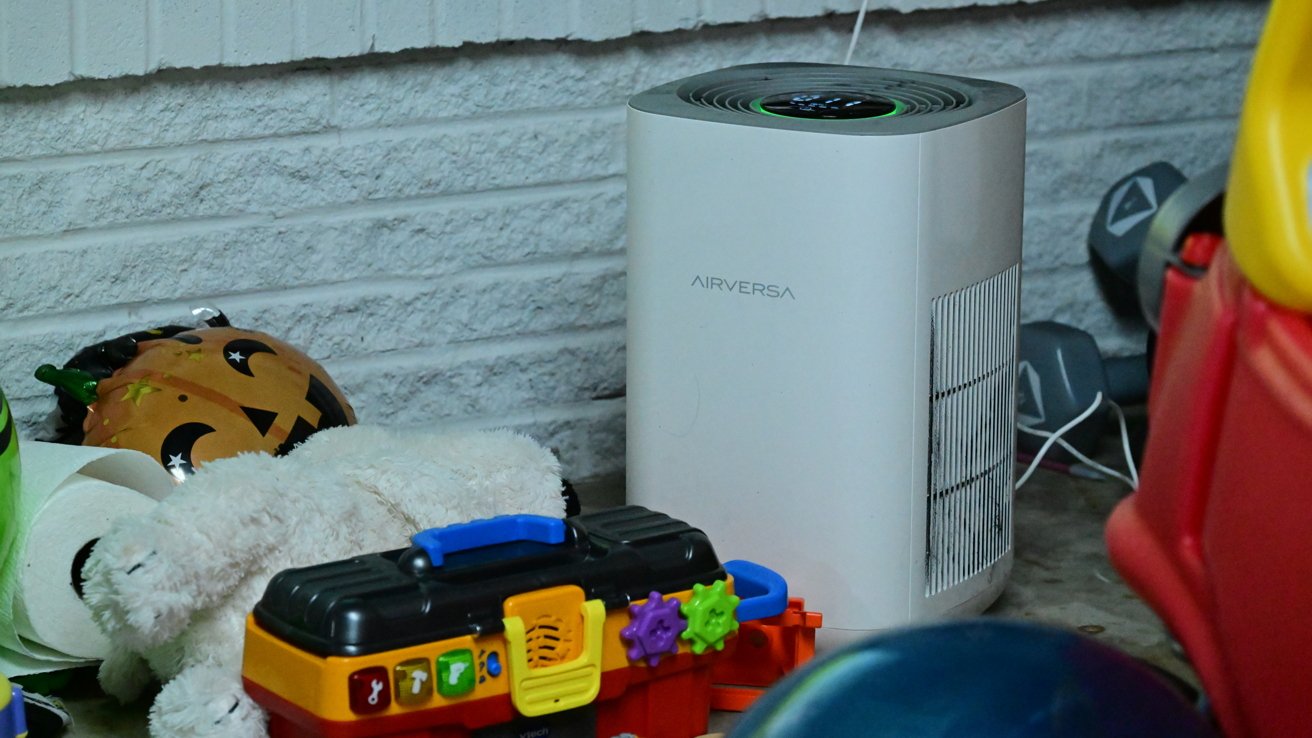
The AP2 features a minimalist aesthetic with a light grey body complemented by a darker grey top. Its compact dimensions make it suitable for various spaces without being obtrusive. Air intake occurs through vents on both sides, passing through dual HEPA filters before being expelled from the top. These filters are adept at capturing 99.97% to 99.99% of airborne particles as small as 0.1 micrometers.
Replacing the filters is straightforward: invert the device, twist the lock mechanism, and access the filters via pull tabs. The top houses a circular display encircled by an LED ring that changes color based on air quality—green for excellent conditions, transitioning to red as quality diminishes. While informative, some users might find the LED ring overly prominent. The display also provides touch controls and various status indicators, though its utilitarian design may not appeal to everyone.
Performance
Despite its modest size, the AP2 delivers commendable performance suitable for small to medium-sized rooms. The manufacturer suggests effectiveness in areas up to approximately 1,000 square feet, though optimal results are observed in bedrooms, offices, and similar spaces.
Users can choose between standard HEPA filters and HEPA Pro filters, the latter offering enhanced filtration capabilities. Each filter comprises a pre-filter, a HEPA layer, and an active carbon layer to neutralize odors. The filters have a lifespan of about 3,000 hours, translating to nearly six months of continuous use. Replacement filters are reasonably priced at under $30, making maintenance cost-effective.
In practical scenarios, the AP2 effectively mitigates smoke during cooking and reduces paint odors, demonstrating its efficiency in maintaining air quality.
Connectivity and Integration
The AP2 is designed exclusively for Apple Home, allowing control via the Apple Home app and the Sleekpoint app. Notably, Sleekpoint Innovations is the parent company behind AirVersa, which might cause some confusion due to branding differences.
Within the Apple Home app, users can switch modes (auto, manual, or off), monitor air quality, and adjust fan speeds. However, filter life monitoring is not available through the app. Integration with Apple Home enables scheduling, automation based on location, and voice control via Siri. For instance, the purifier can be set to activate upon leaving home or as part of a bedtime routine.
The AP2’s support for Thread—a wireless protocol that establishes a self-healing mesh network—ensures quick and reliable responses, especially when paired with a Thread border router like a HomePod, HomePod mini, or Apple TV. This connectivity enhances the device’s responsiveness and reliability within a smart home ecosystem.
Considerations
While the AP2 excels in functionality and connectivity, its design may not appeal to those seeking a more stylish appliance. Additionally, the Apple Home app currently lacks support for night mode, and the manufacturer’s app name might be confusing for some users.
Conclusion
The AirVersa AP2 Air Purifier stands out for its robust performance, seamless integration with Apple Home, and reliable Thread connectivity. Its compact size and affordable maintenance make it a practical choice for enhancing indoor air quality. For users prioritizing functionality and smart home compatibility over aesthetic design, the AP2 is a commendable option.
Pros:
– Reliable Thread connectivity
– Apple Home integration
– Effective performance in small to medium rooms
– Affordable replacement filters
– Night mode feature
– Visual air quality indicator
– On-device touch controls
Cons:
– Utilitarian design
– Apple Home app lacks night mode support
– Potential confusion due to manufacturer’s app branding
Rating: 3.5 out of 5