Xbox Cloud Gaming Expands to Amazon Fire TV: Play Without a Console
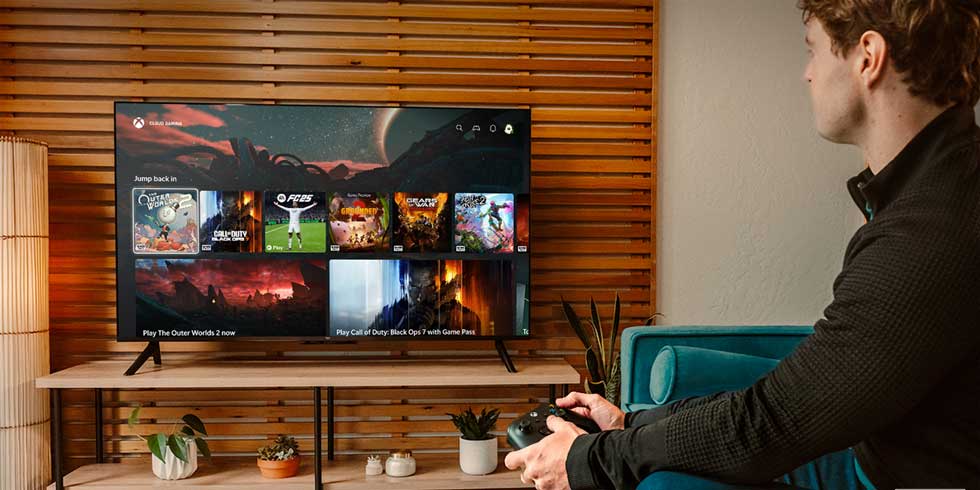
In a significant development for the gaming community, Microsoft has partnered with Amazon to bring Xbox Cloud Gaming to select Amazon Fire TV devices. This collaboration allows gamers to stream and play a vast library of Xbox titles directly on their Fire TV, eliminating the need for a traditional gaming console.
Seamless Integration with Fire TV
Starting in July 2024, the Xbox app became available on the Fire TV Stick 4K Max (2023) and Fire TV Stick 4K (2023). This integration offers a cost-effective and convenient way for users to access Xbox’s extensive game library. To get started, users need:
– A compatible Fire TV device.
– A Bluetooth-enabled wireless controller (such as the Xbox Wireless Controller, Xbox Adaptive Controller, PlayStation DualSense, or DualShock 4).
– An active Xbox Game Pass Ultimate subscription.
Once these components are in place, users can download the Xbox app from the Amazon Appstore, sign in with their Microsoft account, and begin playing immediately.
Diverse Game Library at Your Fingertips
Xbox Game Pass Ultimate subscribers gain instant access to hundreds of cloud-enabled games. Notable titles include:
– Senua’s Saga: Hellblade II: An immersive action-adventure game that delves into the mind of its protagonist.
– Starfield: A highly anticipated space exploration RPG from Bethesda Game Studios.
– Forza Horizon 5: A thrilling racing game set in a dynamic open world.
Additionally, fans of the Fallout series can enjoy Fallout 4 and Fallout 76 on their Fire TV devices. This integration coincides with the release of the acclaimed Fallout TV series on Prime Video, offering a comprehensive experience for enthusiasts.
How to Get Started
To begin gaming on your Fire TV:
1. Install the Xbox App: Navigate to the Amazon Appstore on your Fire TV device and download the Xbox app.
2. Sign In: Open the app and sign in with your Microsoft account. If you’re not already a Game Pass Ultimate member, you can join through the app.
3. Connect a Controller: Pair a compatible Bluetooth-enabled wireless controller with your Fire TV device.
4. Start Playing: Browse the extensive game library and select a title to start playing.
A Portable Gaming Solution
One of the standout features of this integration is its portability. The compact nature of the Fire TV Stick allows users to easily move their gaming setup between different TVs or take it on the go. As long as there’s a stable internet connection, gamers can access their favorite titles and saved progress from virtually anywhere.
Expanding Accessibility
This collaboration between Microsoft and Amazon is part of a broader initiative to make gaming more accessible. By bringing Xbox Cloud Gaming to Fire TV devices, Microsoft is reaching a wider audience, including those who may not own a traditional gaming console. This move aligns with Microsoft’s vision of democratizing gaming and providing more choices for players worldwide.
Future Prospects
The partnership between Xbox and Amazon signifies a shift in the gaming industry towards cloud-based solutions. As technology continues to evolve, we can anticipate further integrations and collaborations that will make gaming more flexible and accessible. This development is a testament to the industry’s commitment to meeting the diverse needs of gamers and embracing innovative platforms.
Conclusion
The integration of Xbox Cloud Gaming with Amazon Fire TV devices marks a significant milestone in the evolution of gaming. By eliminating the need for a console, this collaboration offers a convenient, affordable, and portable solution for gamers. Whether you’re a seasoned player or new to the gaming world, this development opens up a world of possibilities, allowing you to enjoy a vast library of games directly from your Fire TV device.