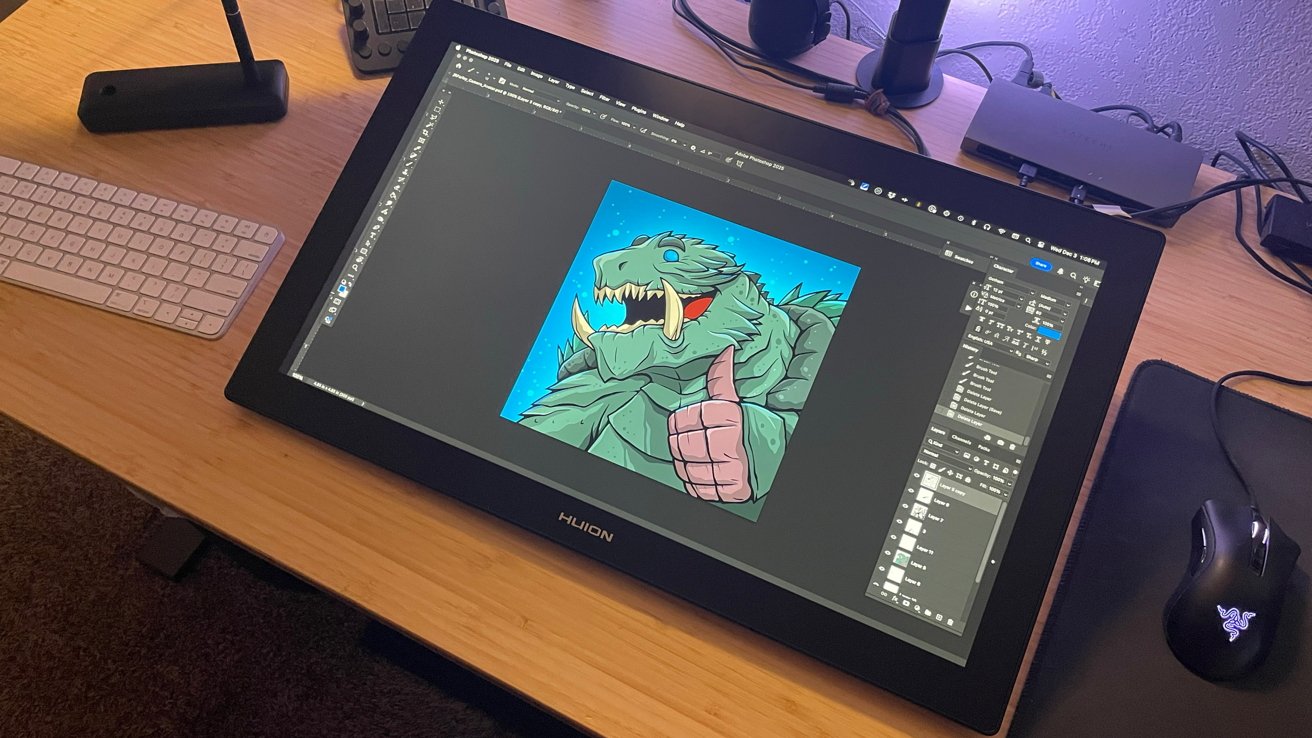
Huion Kamvas Pro 24 (Gen 3): A Game-Changer in Digital Artistry
The digital art landscape is witnessing a significant shift with the introduction of the Huion Kamvas Pro 24 (Gen 3). This latest offering from Huion is not just an incremental upgrade; it’s a bold statement that challenges the dominance of established players like Wacom.
Effortless Setup and Versatile Connectivity
Right out of the box, the Kamvas Pro 24 (Gen 3) impresses with its user-friendly setup. Artists can choose from three connection methods: a direct USB-C to USB-C link for a streamlined single-cable experience, an HDMI connection paired with a USB-C to USB-A adapter, or a DisplayPort option with the same adapter. This flexibility ensures compatibility with a wide range of devices, including Mac systems. The installation process is swift, with the Huion driver for Mac facilitating a seamless integration, allowing artists to dive into their creative work without delay.
Robust Driver Software with Customization
Huion’s driver software stands out for its comprehensive customization options. Artists can tailor button mappings on the stylus, adjust pen pressure sensitivity, and configure settings to align with their unique workflows. The ability to create specific profiles for different applications enhances efficiency, catering to the diverse needs of digital creators.
Superior Performance and User Experience
In practical use, the Kamvas Pro 24 (Gen 3) delivers a stellar performance. Notably, it operates silently, devoid of any fan noise, which is a significant advantage for artists who require a quiet workspace. Extended usage reveals no noticeable increase in surface temperature, indicating effective thermal management.
The stylus pens provided are both lightweight and durable, featuring an ergonomic rubber grip that ensures comfort during prolonged sessions. The inclusion of both standard plastic and soft felt nibs allows artists to choose a drawing experience that best suits their preferences. The laminated screen surface offers a subtle resistance, closely mimicking the feel of drawing on paper, which enhances control and precision.
Line quality and responsiveness are critical for digital artists, and the Kamvas Pro 24 (Gen 3) excels in these areas. The device exhibits consistent and sharp line rendering, with no instances of cursor lag or float, a notable improvement over previous models. This reliability instills confidence in artists, ensuring that their creative intentions are accurately translated onto the digital canvas.
Touch Functionality and Ergonomic Design
The Kamvas Pro 24 (Gen 3) incorporates touch functionality, catering to artists accustomed to touch gestures from devices like iPads. A conveniently located switch allows users to enable or disable this feature, preventing unintended touch inputs and offering flexibility based on individual preferences.
The inclusion of the Keydial Mini peripheral is a thoughtful addition, providing customizable keys and a rotary wheel for executing shortcuts and commands efficiently. While the Keydial Mini is a valuable tool, its design as a separate desk accessory may require some users to adjust their workspace setup to accommodate it effectively.
Competitive Pricing and Value Proposition
The Kamvas Pro 24 (Gen 3) is positioned as a formidable competitor to Wacom’s offerings, delivering comparable, if not superior, performance at a more accessible price point. This combination of quality and affordability makes it an attractive option for both professional artists and enthusiasts seeking high-end features without the premium cost.
Conclusion
The Huion Kamvas Pro 24 (Gen 3) marks a significant advancement in digital art tools, offering a blend of performance, customization, and value that challenges the status quo. Its user-centric design and robust feature set make it a compelling choice for artists aiming to elevate their digital creations.