Introducing LightBuddy: Transform Your Mac Display into a Customizable Ring Light
In the ever-evolving landscape of digital communication, achieving optimal lighting during video calls has become paramount. Traditional solutions often involve external ring lights or makeshift setups, which can be cumbersome and space-consuming. Enter LightBuddy, a groundbreaking macOS application developed by Gui Rambo, designed to revolutionize your video conferencing experience by turning your Mac’s display into a fully customizable ring light.
The Genesis of LightBuddy
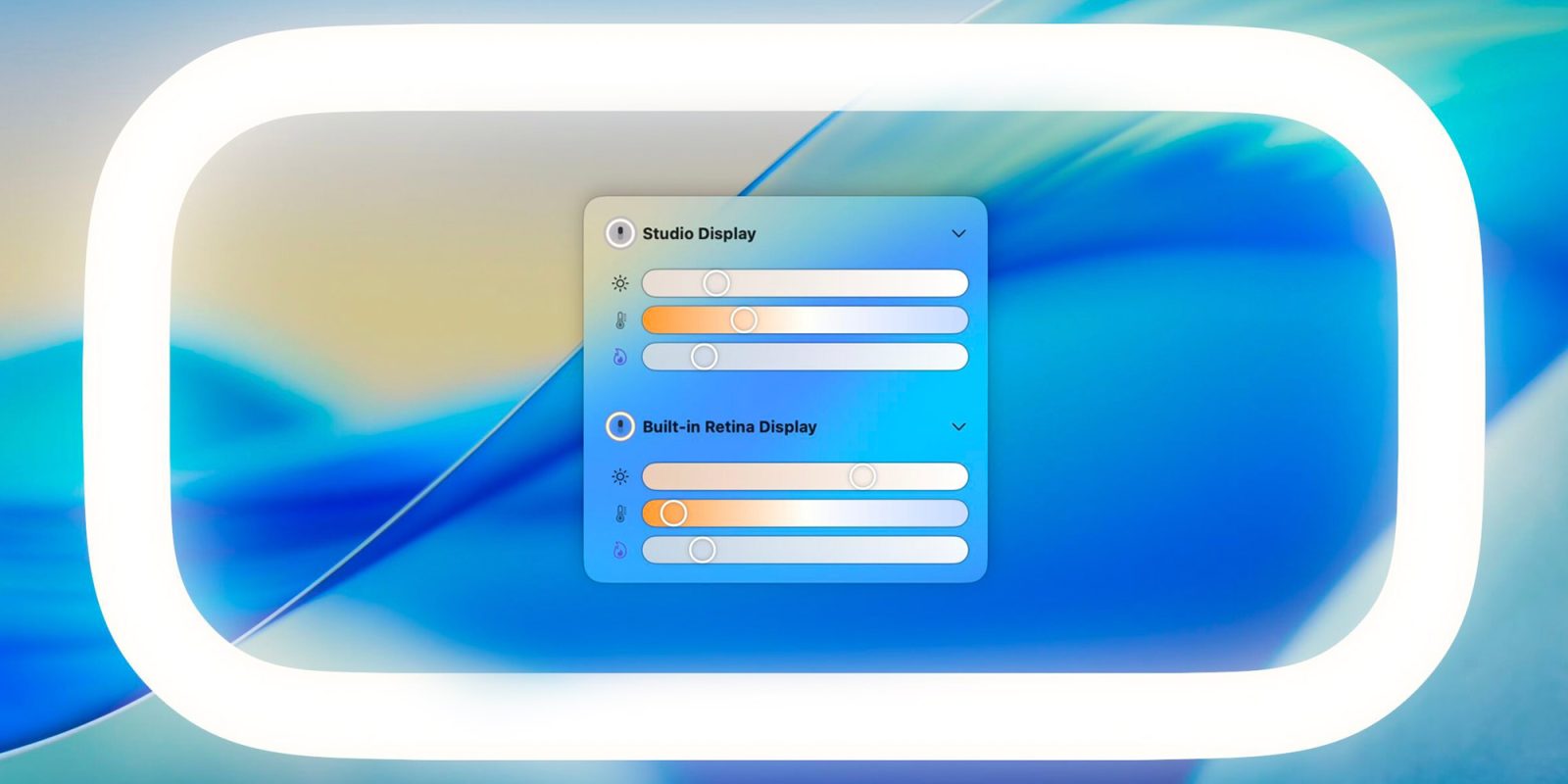
The inception of LightBuddy traces back to a simple yet innovative idea: utilizing the Mac’s own display to create a ring-light effect, thereby eliminating the need for external lighting equipment. Initially, Rambo shelved the project, questioning its practicality and user demand. However, the release of macOS 26.2 introduced the Edge Effect feature, which validated his concept and reignited his commitment to bringing LightBuddy to fruition.
Key Features of LightBuddy
LightBuddy is not just another lighting app; it offers a suite of features that cater to diverse user needs:
– HDR Support: For users with HDR-capable displays, LightBuddy provides enhanced lighting effects with adjustable intensity, ensuring vibrant and dynamic visuals.
– Comprehensive Color Control: Beyond standard blue and amber temperature adjustments, LightBuddy allows users to select any color for the light, offering unparalleled customization to match personal preferences or specific environments.
– Multi-Display Compatibility: Recognizing the diverse setups of modern users, LightBuddy supports multiple displays, enabling independent configurations for each screen. This ensures consistent lighting across all monitors, tailored to individual requirements.
– Adaptive Dimming: To maintain an unobtrusive user experience, LightBuddy incorporates a subtle distortion and dimming effect. As the cursor approaches the edge of the screen, the light dims slightly, preventing distraction and ensuring seamless interaction with on-screen elements.
User Experience and Interface
LightBuddy integrates seamlessly into the macOS environment, residing in the menu bar for easy access. Its interface draws inspiration from Apple’s Liquid Glass design, offering a sleek and intuitive user experience. Users can fine-tune various settings, including light intensity, color, and behavior, to achieve the desired lighting effect.
Compatibility and System Requirements
One of LightBuddy’s standout advantages is its broad compatibility. Unlike Apple’s Edge Effect, which is exclusive to Apple Silicon Macs running macOS 26.2, LightBuddy operates on any Mac running macOS 14 or later, including Intel-based models. While optimized for Apple displays such as modern MacBooks, Studio Display, and Pro Display XDR, LightBuddy also functions on third-party monitors like LG’s UltraFine series, though performance may vary.
Future Enhancements
Rambo is committed to continuous improvement and has outlined several upcoming features for LightBuddy:
– Keyboard Shortcuts and Shortcuts Integration: To streamline user control, future updates will introduce customizable keyboard shortcuts and integration with macOS Shortcuts, allowing for quick adjustments and automation.
– Night Mode and True Tone Support: Recognizing the importance of eye comfort and color accuracy, upcoming versions will include Night Mode and True Tone support, enabling automatic color temperature adjustments based on ambient lighting conditions.
Availability and Pricing
LightBuddy is available for purchase at $4.99. For more information and to download the app, visit the official website.
Conclusion
LightBuddy represents a significant advancement in enhancing video call lighting without the need for external equipment. Its comprehensive feature set, user-friendly interface, and broad compatibility make it an invaluable tool for professionals and casual users alike. As digital communication continues to dominate, solutions like LightBuddy ensure that users present themselves in the best possible light, quite literally.