Google Maps Enhances Parking Experience with Automatic Location Saving and Custom Icons on iOS
Google Maps has introduced a significant update for iOS users, enhancing the parking experience by automatically saving parking locations and incorporating custom icons. This development aims to simplify the process of locating parked vehicles and adds a personalized touch to the app’s interface.
Automatic Parking Location Saving
Traditionally, Google Maps required users to manually save their parking spots. This process involved tapping a button within the app to mark the location. While functional, it depended on user intervention, which could be easily overlooked.
The new feature automates this process. When an iOS user connects their device to their car via USB, Bluetooth, or CarPlay and uses Google Maps for navigation, the app detects when the vehicle is parked. It then automatically saves the parking location without any manual input. This saved location remains accessible for up to 48 hours or until the user starts driving again, ensuring that users can easily find their parked cars even after extended periods.
Integration of Custom Car Icons
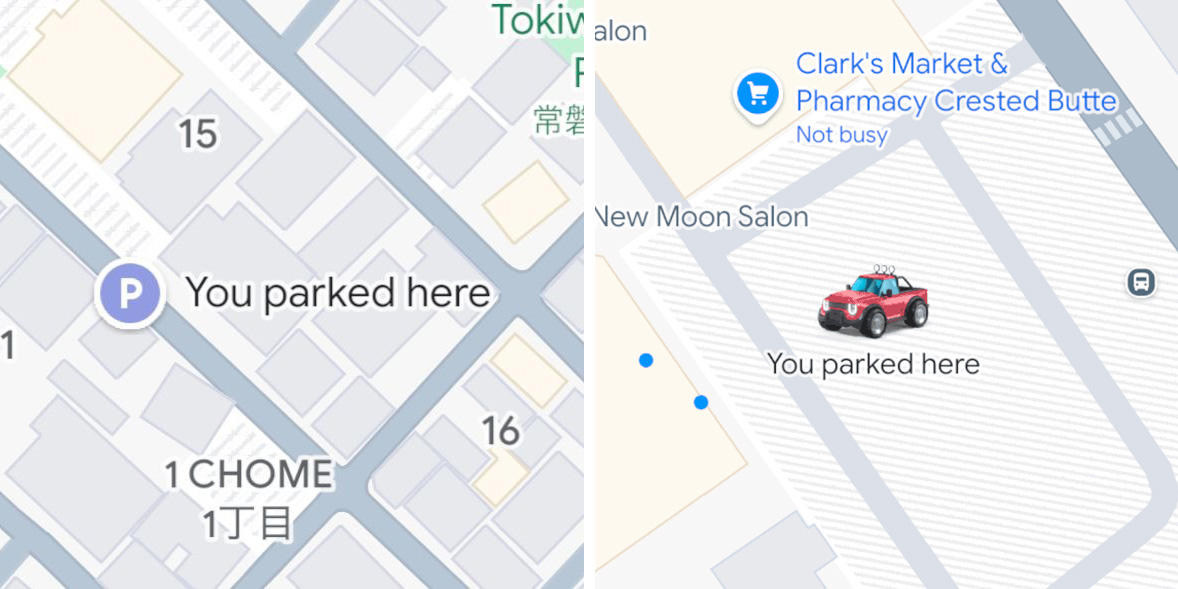
In addition to automatic parking location saving, Google Maps now supports custom car icons for parked vehicles. Previously, the app used a standard P icon to denote parking spots. With this update, if a user has selected a custom car icon for navigation, the same icon will represent the parked vehicle’s location on the map. This feature adds a layer of personalization and visual consistency to the user experience.
Availability and Future Prospects
As of now, these enhancements are exclusive to iOS users. The automatic parking location feature leverages the connection between the iOS device and the car through USB, Bluetooth, or CarPlay. There is no official information regarding when or if these features will be available for Android users. Currently, Android users must continue to manually save their parking locations within the app.
Historical Context and Evolution
The ability to save parking locations in Google Maps is not entirely new. Over the years, the feature has evolved:
– Manual Saving: Initially, users had to manually tap a button to save their parking spot.
– Android Auto Integration: A button appeared on Android Auto interfaces upon reaching a destination, prompting users to save their parking location.
– Custom Car Icons: Introduced in 2020, this feature allowed users to select different car shapes and colors for navigation, enhancing personalization.
The recent update represents a significant step by automating the parking location saving process and integrating it with custom icons, thereby streamlining the user experience.
User Experience and Practical Implications
For iOS users, this update offers several practical benefits:
– Convenience: Eliminates the need to remember to manually save parking locations.
– Time-Saving: Reduces the steps required to mark and later find a parked vehicle.
– Personalization: The use of custom icons makes the app more user-friendly and visually appealing.
However, it’s important to note that the automatic saving feature relies on the device’s connection to the car. Users who do not connect their devices via USB, Bluetooth, or CarPlay may not benefit from this automation.
Conclusion
Google Maps’ latest update for iOS users marks a significant advancement in navigation and parking assistance. By automating the parking location saving process and incorporating custom icons, the app enhances user convenience and personalization. While Android users await similar features, this update underscores Google’s commitment to improving user experience through continuous innovation.