Cybercriminals Exploit Microsoft Teams Notifications in Sophisticated Callback Phishing Scheme
In a recent development, cybersecurity experts have uncovered a sophisticated phishing campaign that leverages Microsoft Teams notifications to deceive users into contacting fraudulent support numbers. This method underscores the evolving tactics of cybercriminals who exploit trusted communication platforms to bypass traditional security measures.
The Mechanism of the Attack
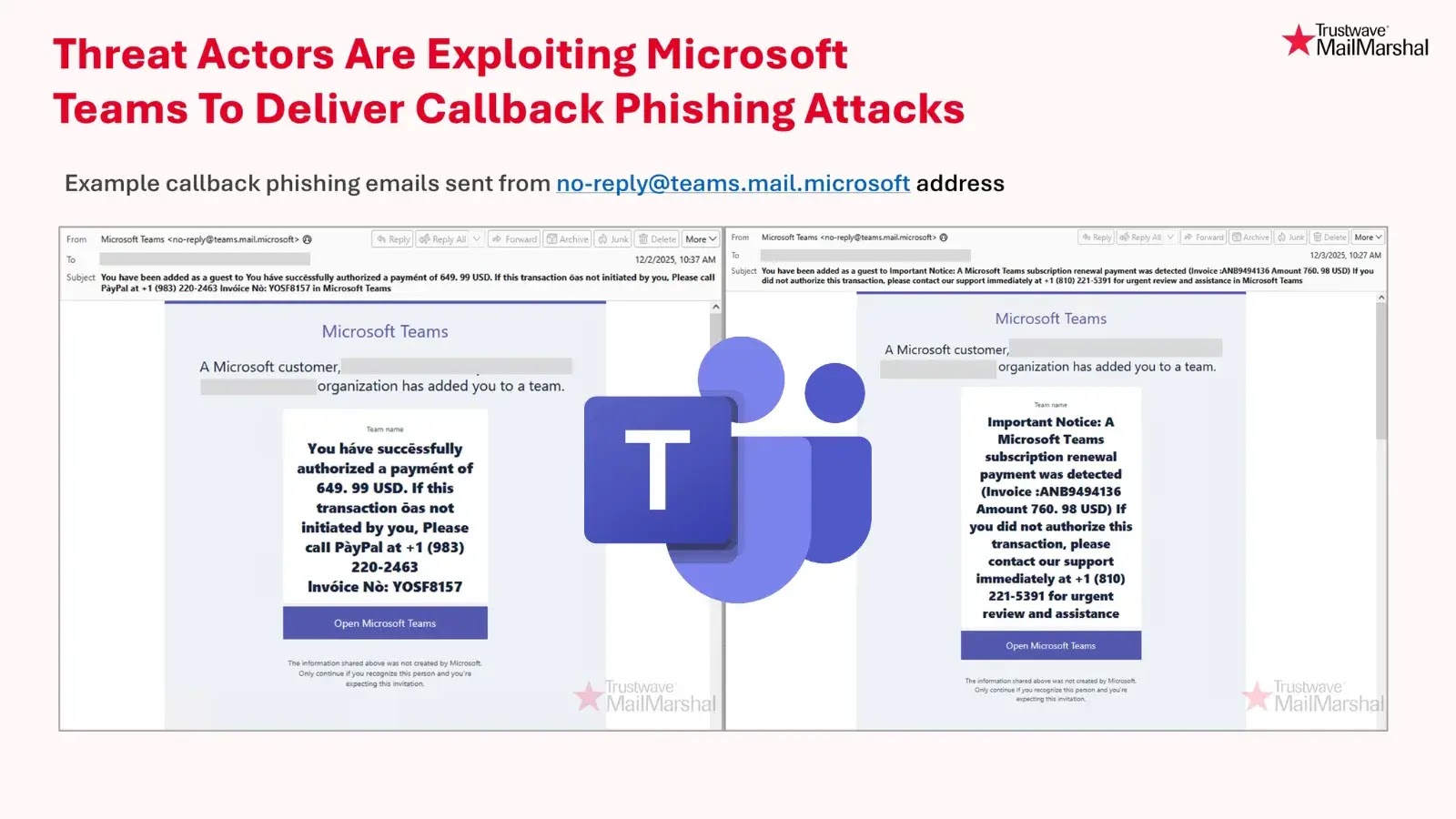
According to SpiderLabs, the attackers initiate the scheme by adding unsuspecting users to Microsoft Teams groups with deceptive names that mimic urgent financial matters. These group names often reference fake invoices, unauthorized payment claims, or auto-renewal notices, creating a sense of urgency.
Once added to these groups, victims receive notification emails that appear to originate from legitimate Microsoft Teams infrastructure, specifically from the address [email protected]. These emails contain messages prompting users to contact a provided support number if they did not authorize the mentioned charge.
Exploiting Trust in Microsoft Teams
The authenticity of the emails, stemming from an official Microsoft domain, allows them to bypass email filters and appear credible to recipients. Trusting the source, users are more likely to call the provided number, inadvertently connecting with cybercriminals posing as support agents.
Callback Phishing: A Deceptive Tactic
This campaign exemplifies a refined form of callback phishing, where attackers rely on voice-based social engineering rather than malicious links or attachments. Once victims initiate the call, the fraudsters employ various tactics to extract sensitive information, such as payment card details, account credentials, or other personally identifiable information.
Recommendations for Users and Organizations
To mitigate the risks associated with this phishing scheme, organizations and individuals should consider the following measures:
1. User Education: Inform employees about this specific attack vector. Emphasize the importance of verifying urgent financial requests through official company channels rather than responding directly to unexpected Teams notifications.
2. Email Security Enhancements: Implement additional scrutiny on Teams notifications. Adjust email delivery policies to require manual approval for Teams invitations from unknown groups or external sources.
3. Regular Review of Teams Groups: Encourage users to periodically review their Microsoft Teams group memberships. Be cautious of groups with financial-themed names, especially those that convey urgency.
4. Multi-Factor Authentication (MFA): Enforce MFA across all accounts to add an extra layer of security, making it more challenging for attackers to gain unauthorized access.
5. Robust Email Gateway Security: Maintain and regularly update email security protocols to detect and filter out phishing attempts effectively.
Conclusion
This phishing campaign highlights the continuous adaptation of cybercriminals who exploit trusted platforms and human psychology to achieve their malicious objectives. By staying informed and implementing proactive security measures, organizations and individuals can better defend against such evolving threats.